 Our first app, Migrato, is live on the Shopify App Store

Template Documentation
Every column in the Customers template, what it holds and the values it accepts. 6 min read
 Updated 14 October 2026
 Applies to Migrato on all plans
Migrato uses a structured template for importing and exporting Shopify Customer data.
The template defines the columns that can be used to transfer customer information between Migrato and Shopify.
You can use the template to:
-
 Prepare customer data for import.
-
Understand exported customer data.
-
Modify exported customer data before re-importing.
-
Migrate customer information between Shopify stores.
-
Maintain a consistent customer data structure.
-
Manage customer addresses, marketing preferences, tags, order information, and metafields.
Download the available Customer Demo CSV/XLSX file or export a sample Customer file from Migrato to understand the current template structure.
Customer Template Structure
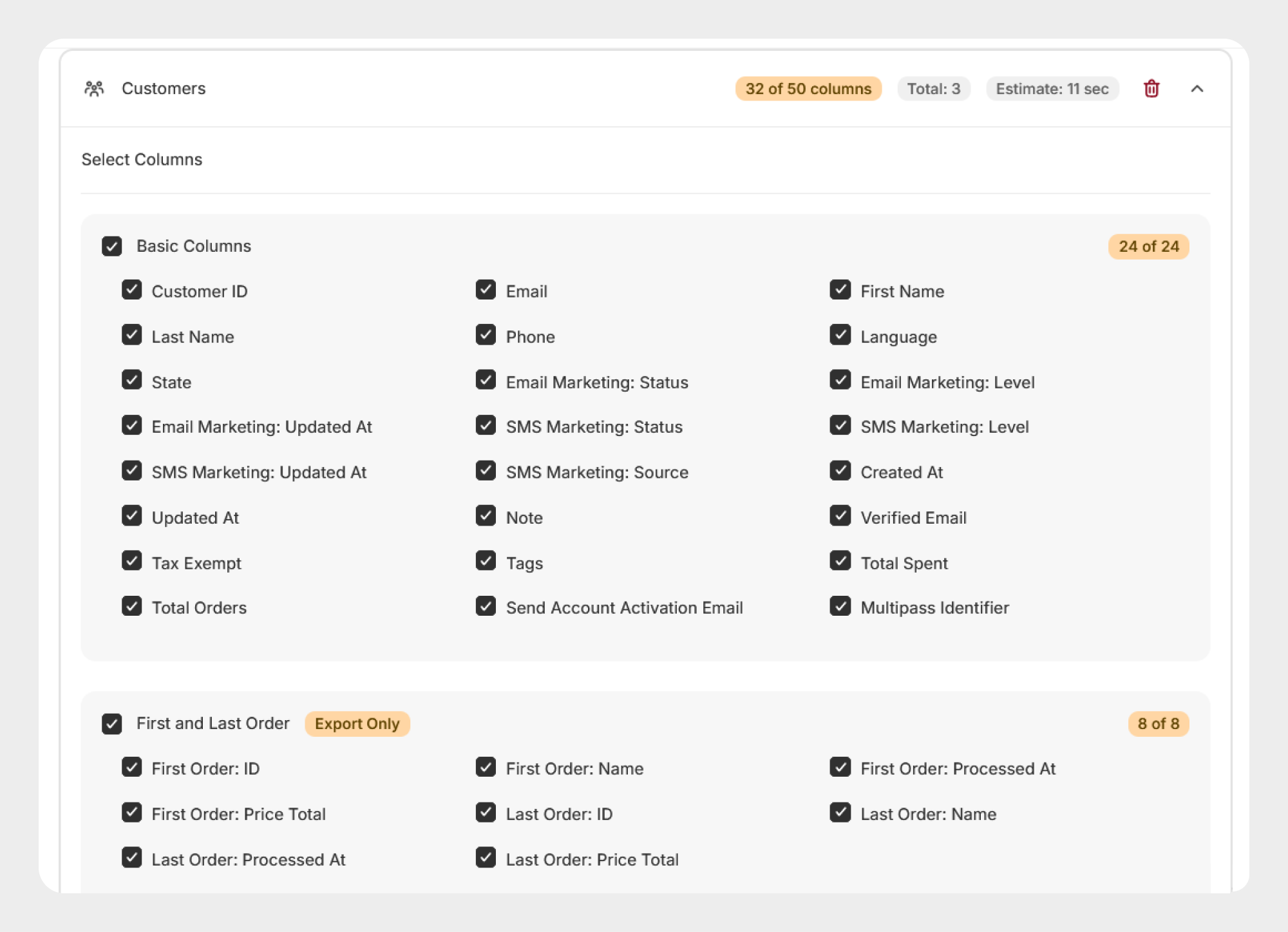
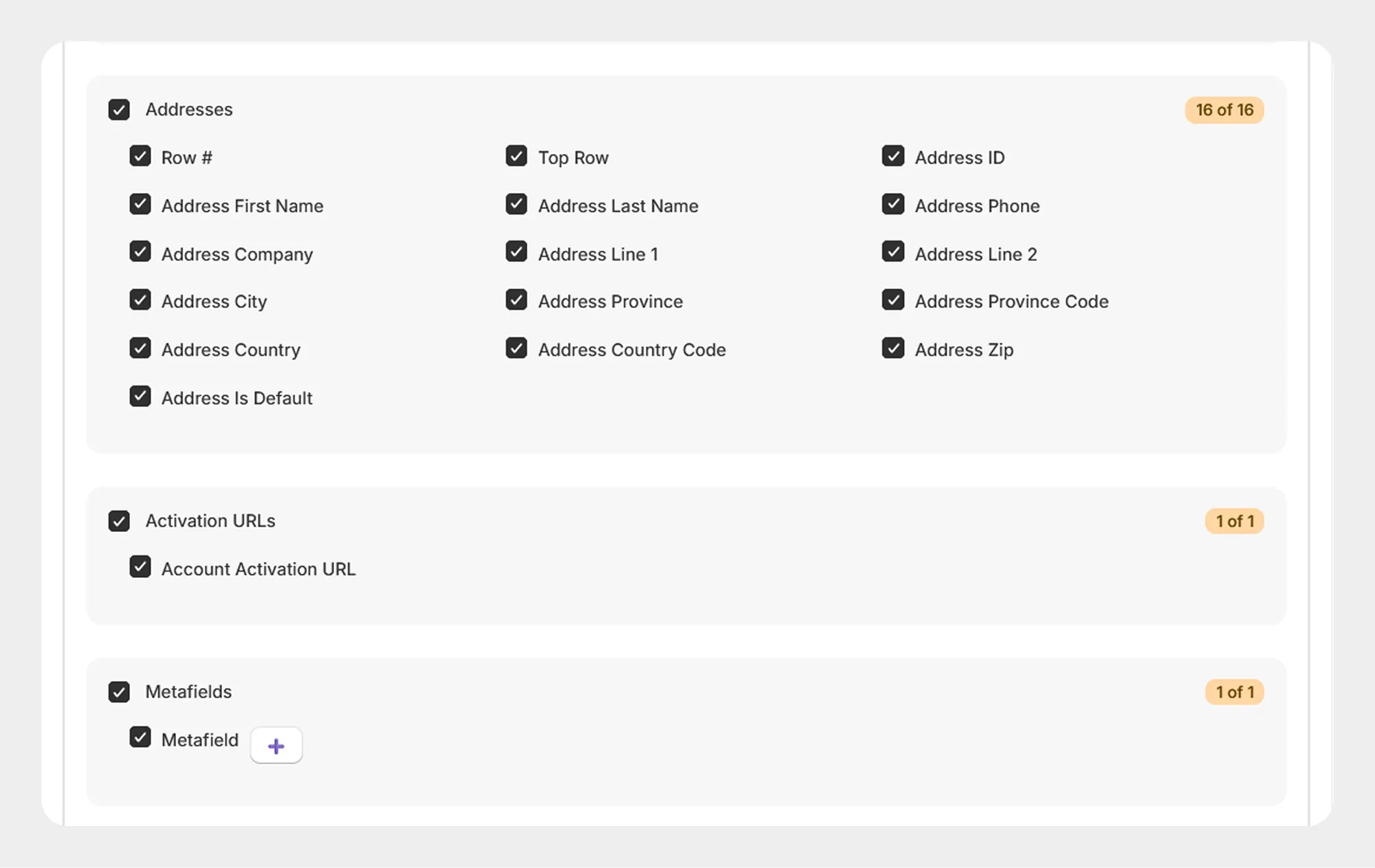
Migrato organizes Customer fields into logical groups to make the template easier to understand and prepare.
| Group | Columns | Description |
|---|---|---|
| Basic Columns | 24 | Contains core customer information and customer account settings. |
| First and Last Order (Export Only) | 8 | Contains information about the customer's first and last orders. |
| Addresses | 16 | Contains customer address information. |
| Activation URLs | 1 | Contains the account activation URL. |
| Metafields | 1 | Contains supported customer metafield information. |
Total: 50 columns
1. Basic Columns
The Basic Columns group contains the primary information associated with a Shopify customer.
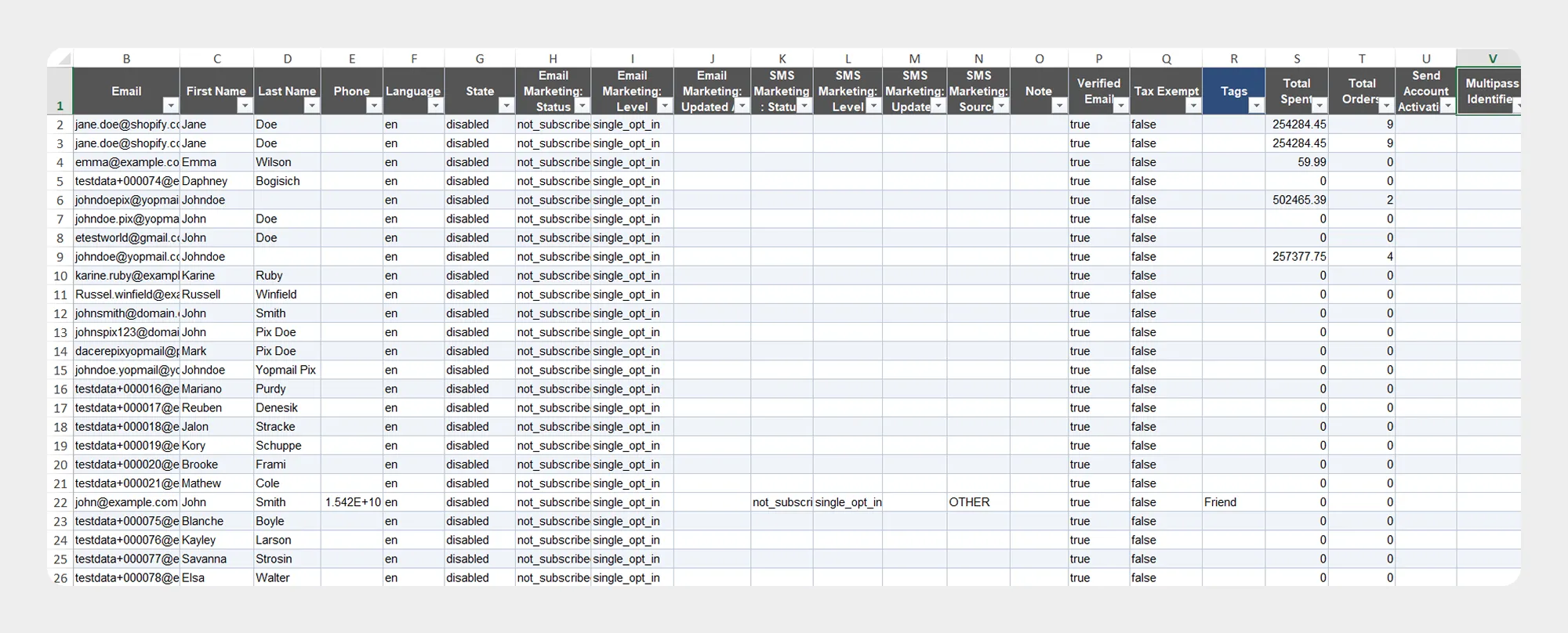
| Column | Description | Allowed Values / Examples |
|---|---|---|
| Customer ID | Unique Shopify identifier for the customer. | Number / Shopify Customer ID |
| Email address associated with the customer. | Email — customer@example.com | |
| First Name | Customer's first name. | Text — John |
| Last Name | Customer's last name. | Text — Smith |
| Phone | Customer's phone number. | Phone number |
| Language | Customer's preferred language. | Language code / supported Shopify value |
| State | Current state of the customer account. | Supported Shopify customer state |
| Email Marketing: Status | Current email marketing subscription status. | Supported Shopify marketing status |
| Email Marketing: Level | Marketing consent or subscription level associated with email marketing. | Supported Shopify value |
| Email Marketing: Updated At | Date and time when the email marketing information was last updated. | Date/time |
| SMS Marketing: Status | Current SMS marketing subscription status. | Supported Shopify marketing status |
| SMS Marketing: Level | Marketing consent or subscription level associated with SMS marketing. | Supported Shopify value |
| SMS Marketing: Updated At | Date and time when the SMS marketing information was last updated. | Date/time |
| SMS Marketing: Source | Source through which the SMS marketing consent or subscription was obtained. | Supported Shopify value |
| Created At | Date and time when the customer was created. | Date/time |
| Updated At | Date and time when the customer was last updated. | Date/time |
| Note | Additional note associated with the customer. | Text |
| Verified Email | Indicates whether the customer's email address is verified. | Yes / No |
| Tax Exempt | Indicates whether the customer is exempt from taxes. | Yes / No |
| Tags | Tags assigned to the customer. | Text / comma-separated tags |
| Total Spent | Total amount spent by the customer. | Number / Currency amount |
| Total Orders | Total number of orders associated with the customer. | Number |
| Send Account Activation Email | Indicates whether an account activation email should be sent. | Yes / No |
| Multipass Identifier | Multipass identifier associated with the customer, where applicable. | Text |
2. First and Last Order
The First and Last Order group contains information about the customer's first and most recent order.
These fields are export-only.
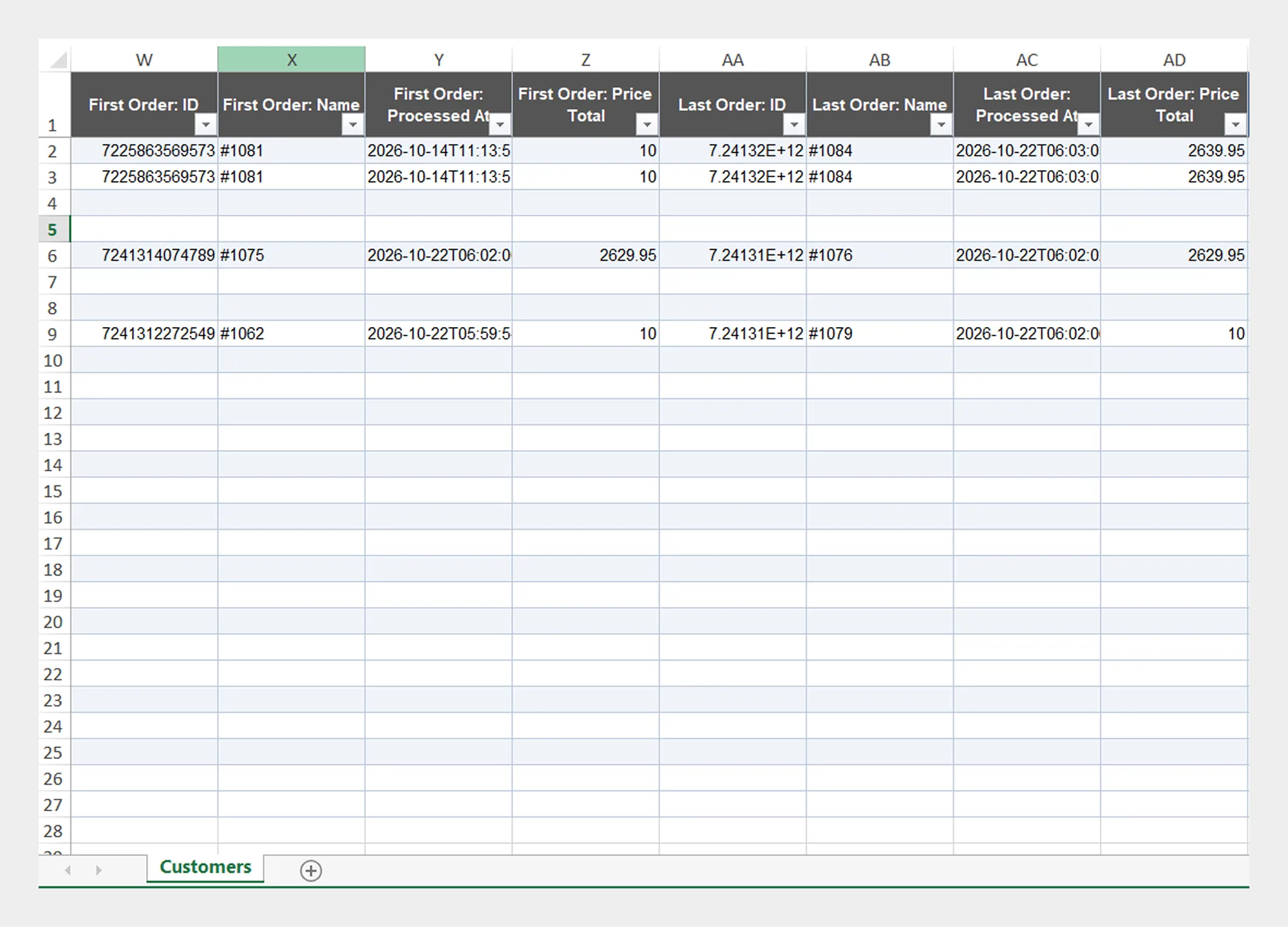
| Column | Description | Allowed Values / Examples |
|---|---|---|
| First Order: ID | Shopify identifier of the customer's first order. | Number / Shopify Order ID |
| First Order: Name | Name or order number of the customer's first order. | Text — #1001 |
| First Order: Processed At | Date and time when the first order was processed. | Date/time |
| First Order: Price Total | Total price of the customer's first order. | Number / Currency amount |
| Last Order: ID | Shopify identifier of the customer's most recent order. | Number / Shopify Order ID |
| Last Order: Name | Name or order number of the customer's most recent order. | Text — #1050 |
| Last Order: Processed At | Date and time when the most recent order was processed. | Date/time |
| Last Order: Price Total | Total price of the customer's most recent order. | Number / Currency amount |
These fields are available for export and provide useful historical information about the customer's first and last orders.
3. Addresses
The Addresses group contains customer address information.
A customer may have one or more addresses. The address fields can be used to manage information such as the customer's name, company, street address, city, province, country, ZIP code, and default-address status.
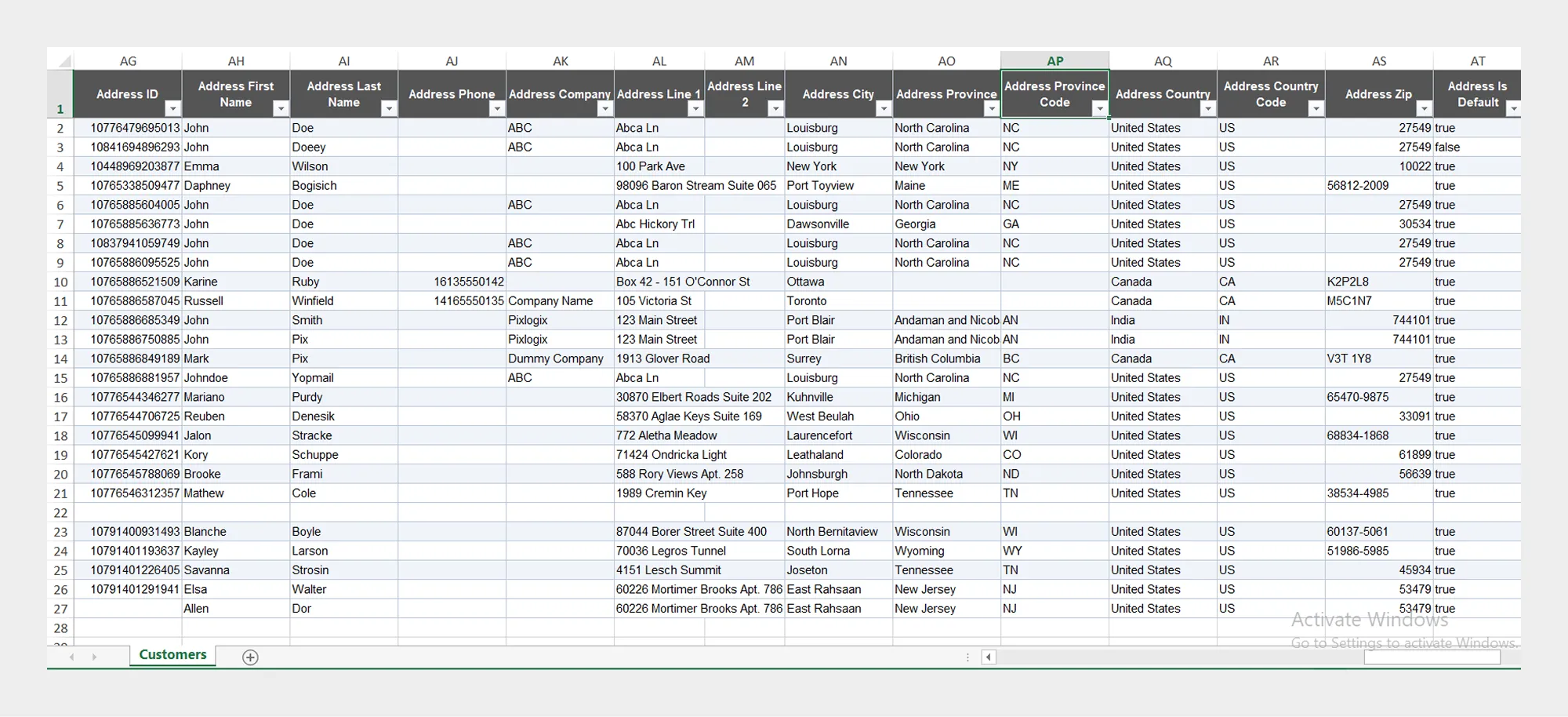
| Column | Description | Allowed Values / Examples |
|---|---|---|
| Row # | Identifies the address row associated with the customer. | Number |
| Top Row | Identifies the top/header row used by the address data structure. | Template value |
| Address ID | Unique identifier for the customer address. | Number / Shopify Address ID |
| Address First Name | First name associated with the address. | Text — John |
| Address Last Name | Last name associated with the address. | Text — Smith |
| Address Phone | Phone number associated with the address. | Phone number |
| Address Company | Company associated with the address. | Text |
| Address Line 1 | Primary street address. | Text |
| Address Line 2 | Additional address information. | Text |
| Address City | City associated with the address. | Text — New York |
| Address Province | State, province, or region associated with the address. | Text |
| Address Province Code | Code for the state, province, or region. | Code — NY |
| Address Country | Country associated with the address. | Text — United States |
| Address Country Code | Country code associated with the address. | ISO country code — US |
| Address Zip | Postal or ZIP code. | Text — 10001 |
| Address Is Default | Indicates whether this is the customer's default address. | Yes / No |
4. Activation URLs
The Activation URLs group contains the account activation URL associated with the customer.
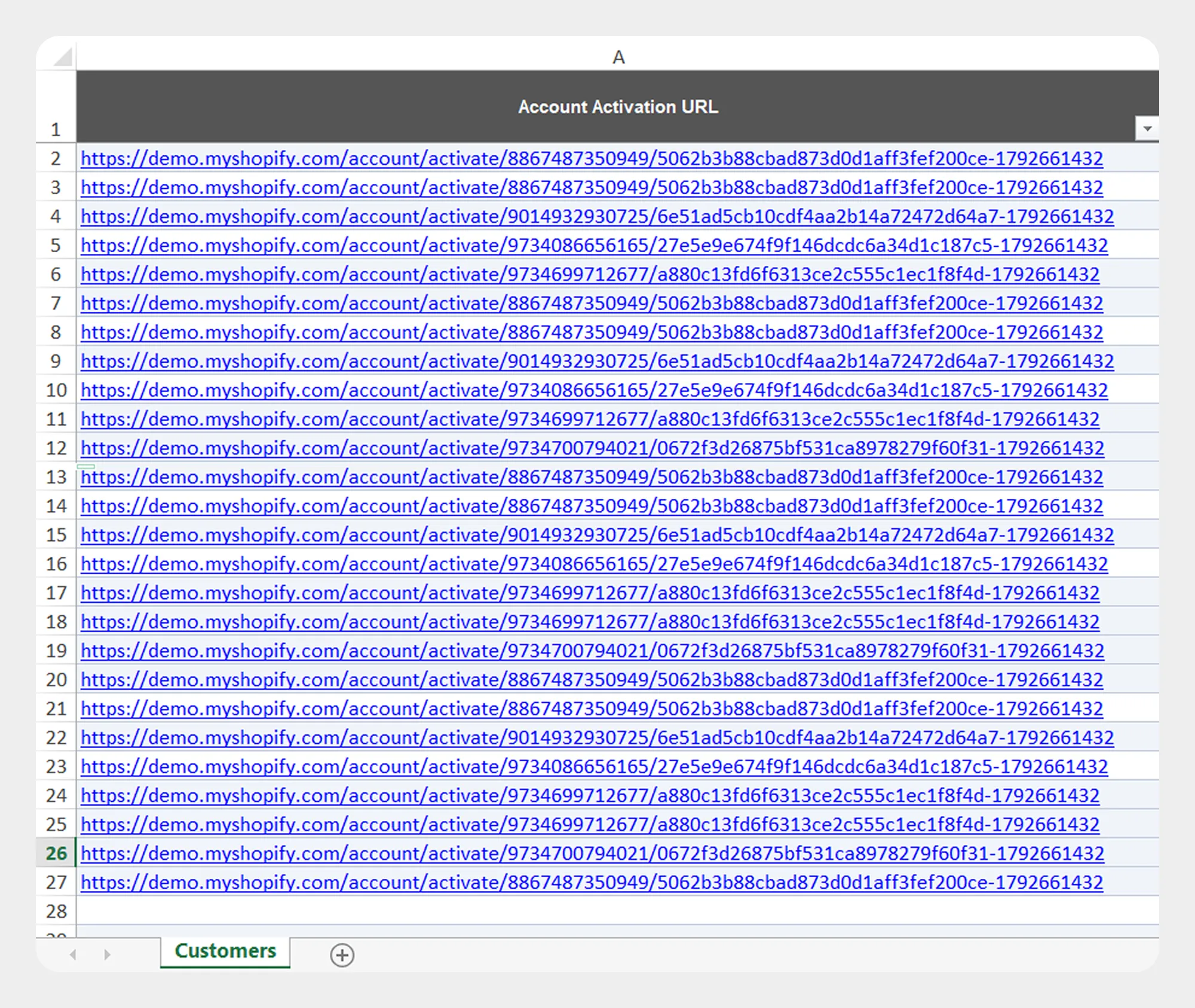
| Column | Description | Allowed Values / Examples |
|---|---|---|
| Account Activation URL | URL used to activate the customer's account where available. | URL |
Treat account activation URLs as sensitive account information and handle exported files securely.
5. Metafields
The Metafields group contains supported customer metafield information.
Metafields can be used to store additional customer information beyond Shopify's standard customer fields.
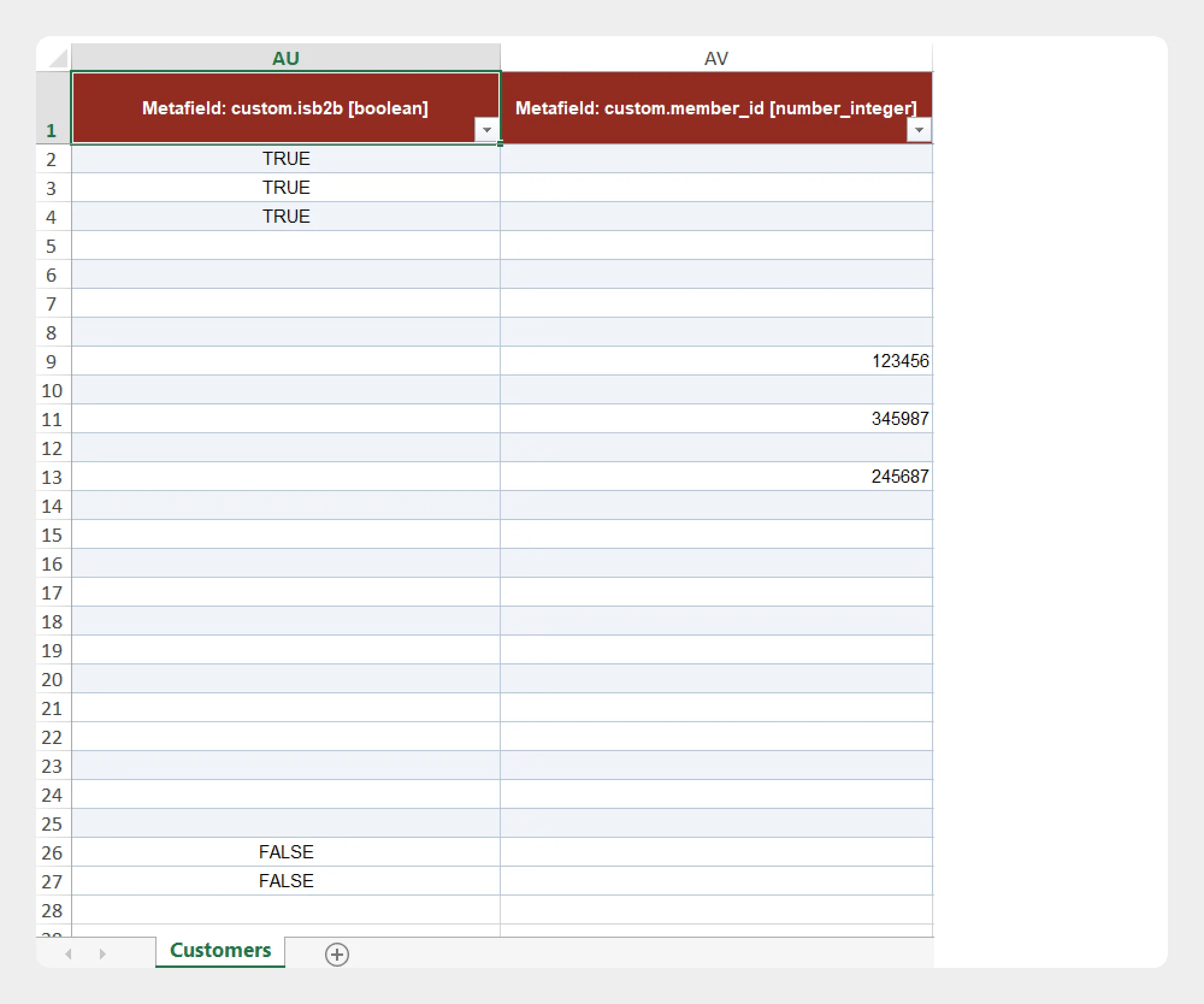
| Column | Description | Allowed Values / Examples |
|---|---|---|
| Metafield | Contains supported customer metafield information. | Metafield value / configured Shopify metafield |
The metafield structure and values should correspond to the metafield definitions configured in your Shopify store.
Preparing a Customer Import File
When preparing a Customer import file:
- Download the Customer Demo CSV/XLSX file, if available.
- Review the Customer Template Documentation.
- Keep the supported column names unchanged.
- Enter customer information according to the expected format.
- Make sure customer email addresses and other identifying information are correctly formatted.
- Review address information carefully.
- Save the file as CSV or XLSX.
- Upload the file to Migrato or provide a publicly accessible file URL.
- Select the required import operation.
- Review the import configuration before starting the job.
Using an exported customer file as a reference can help you understand how Migrato structures customer data for subsequent imports.
Important Notes for Customer Data
-
Use the exact column names provided by the Migrato Customer template.
-
Make sure email addresses are correctly formatted.
-
Use the appropriate format for dates, numbers, Boolean values, IDs, and URLs.
-
Review customer addresses carefully before importing.
-
First and Last Order fields are export-only.
-
Make sure metafield values correspond to the metafield definitions configured in Shopify.
-
Test your import with a small number of customers before processing a large customer dataset.
-
Review the import results and error information after the job is completed.
 Free plan forever