 Our first app, Migrato, is live on the Shopify App Store - free plan, no credit card.
Take a look


 Free plan, no card
 Live in 2 minutes
 Works on every Shopify plan
 No credit card required
 Reviewed by Shopify
 Uninstall anytime
6,431 rowsin this import sheet
 18 minsaved on this job
Insideyour Shopify admin
Migrato · New import
Jobs
Most import apps do the job. These are the reasons merchants tell us they stopped shopping around.

Before a job runs you pick the operation - add new records, update existing ones, do both, or delete the rows in your sheet. Nothing happens that you did not select.

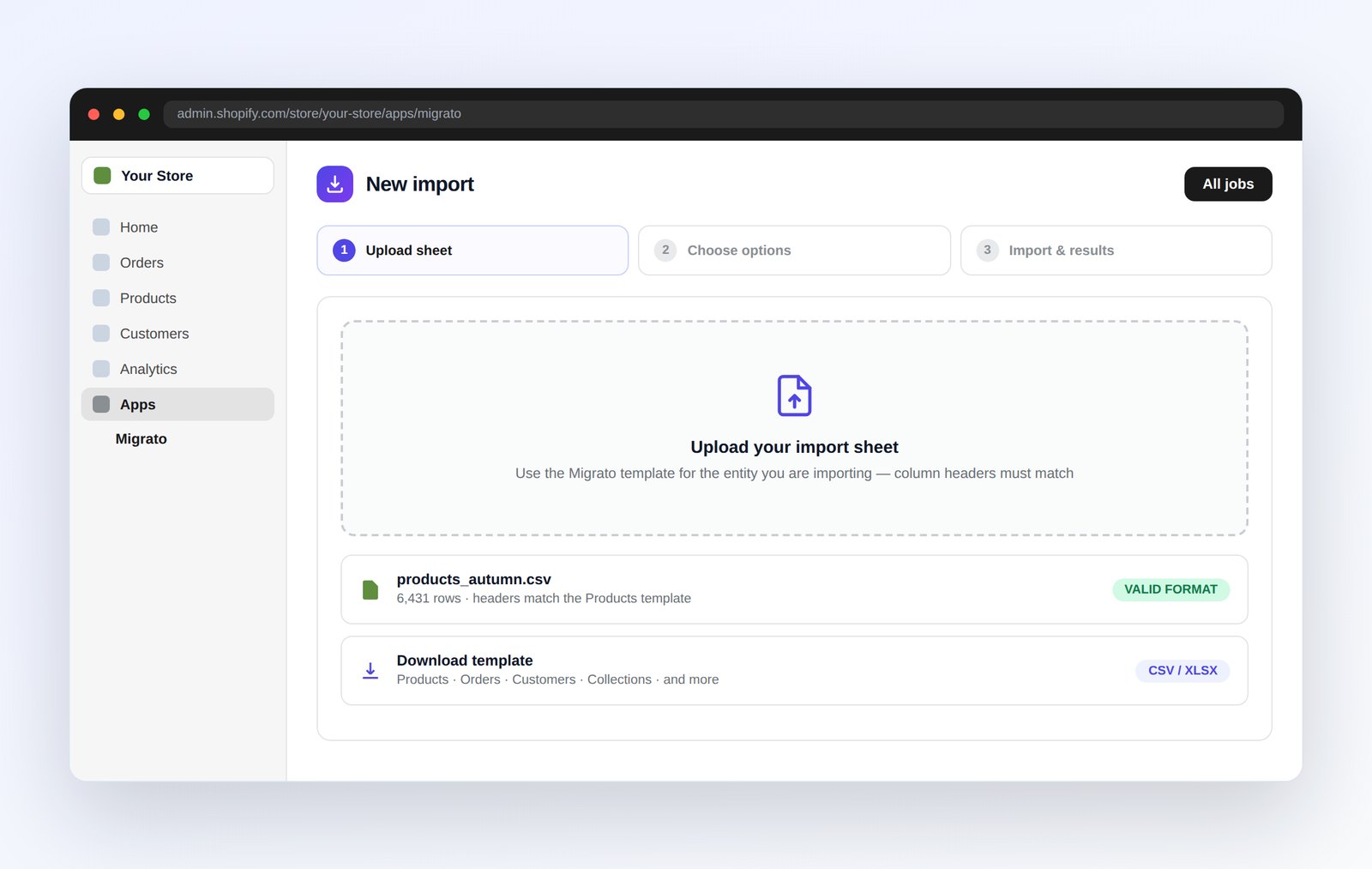
Download the template for the entity you are moving, fill in the columns, upload. Every column is named after the Shopify field it writes to, so there is nothing to configure.

Batched and rate-limit aware, so Shopify never throttles you mid-job. Sixty thousand rows in one run on Pro, unlimited on Premium - while you close the tab.

Schedule exports daily, weekly or monthly and have the file uploaded to your FTP/SFTP server. Fetch a supplier sheet from a file URL or your server on the same schedule.

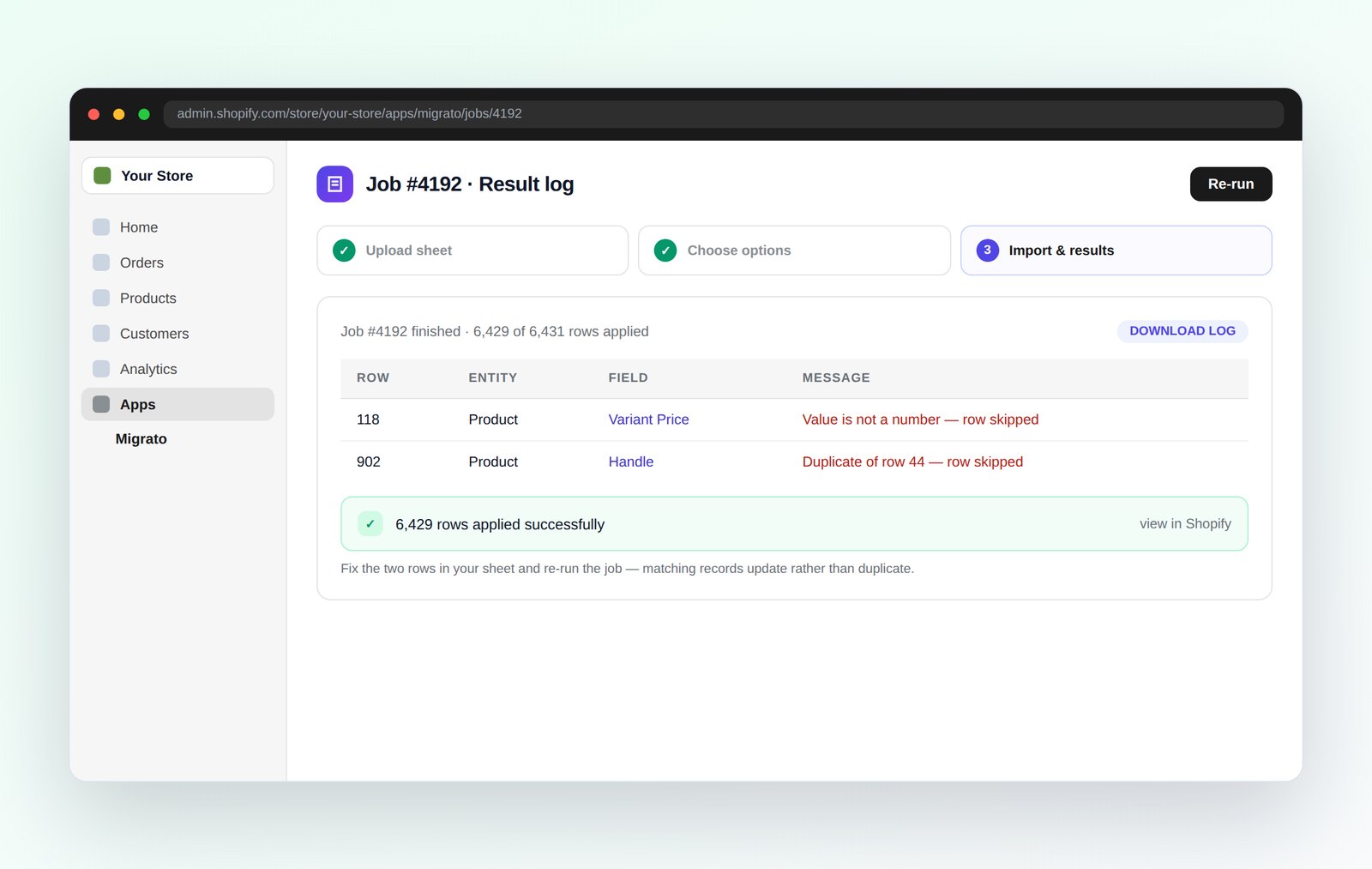
When a job finishes you get a log of every row: what was added, what was updated, and the reason for anything skipped. Download it from the job, and get an email summary when it completes.

Official Shopify OAuth, encrypted in transit and at rest. Your files are removed when you uninstall, and you control how long job history is kept while the app is installed.
Built for merchants who do not have time for broken imports, cryptic errors and support tickets that go unanswered.
Download the template for the entity you are moving, add your values to the matching columns, and upload it. Column headers are named after Shopify's own fields, so the sheet is the whole configuration.
Predefined sheet format
Every entity has its own template with the exact headers the import expects.
Choose the operation
Add new records, update existing ones, do both, or delete the rows in your sheet.
Matched on Shopify's own keys
Handle, SKU, email, order name or ID decide whether a row adds or updates.
Result log on every job
Download a log of every row, with the reason for anything that could not be applied.
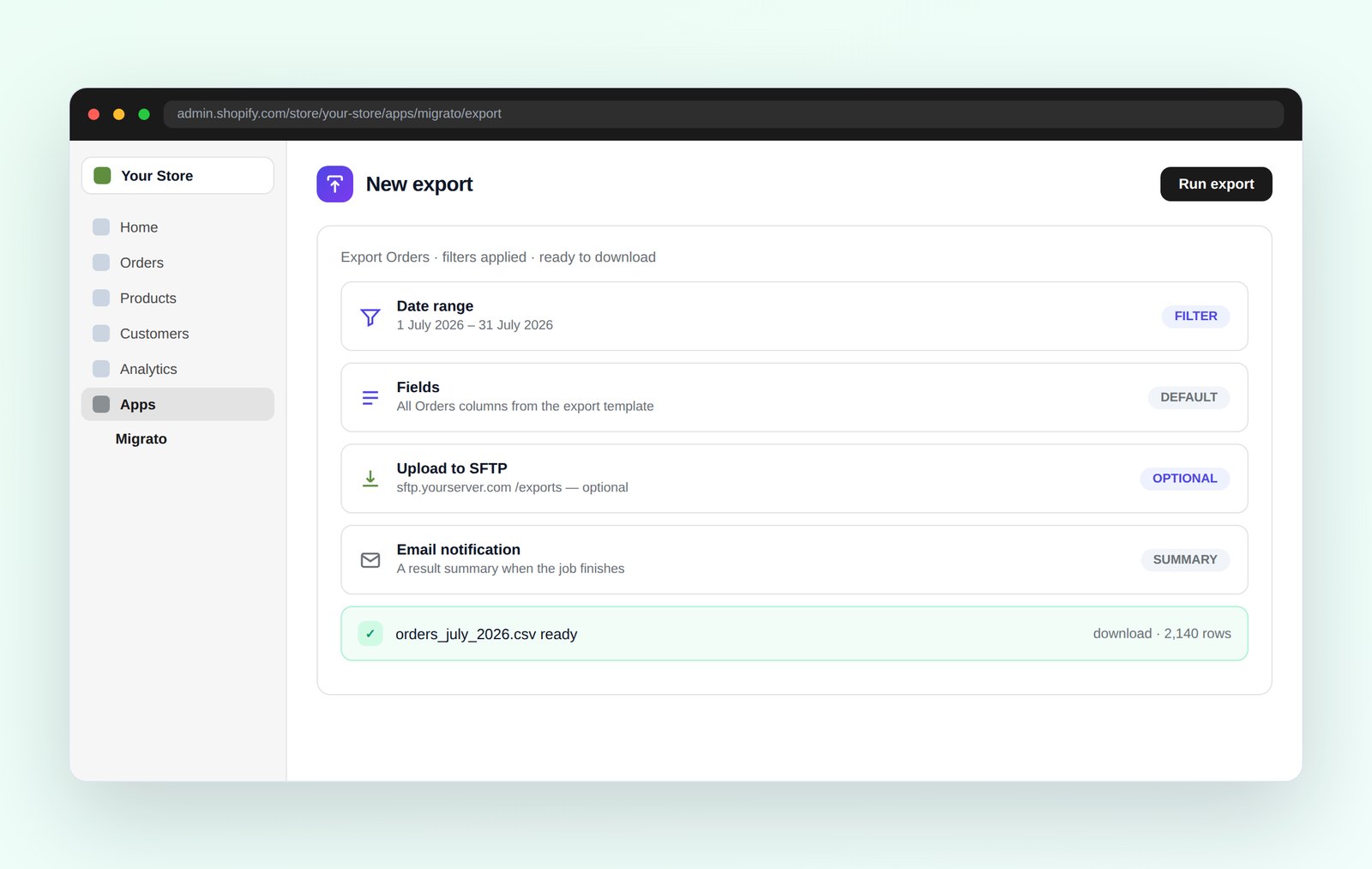
Pick the entity, narrow it with filters, and run. The file comes back in the same sheet format you import with, so an export can go straight back in as an update.
Filter before exporting
By date range, status, collection, vendor or tag, depending on the entity.
Same format both ways
Exports use the import template, so edit in Excel and upload the file straight back.
CSV and XLSX
Real spreadsheet output that survives commas in addresses and non-Latin characters.
Download it, or push it to your server
Keep the file in the job history, or have Migrato upload it to your FTP/SFTP server.
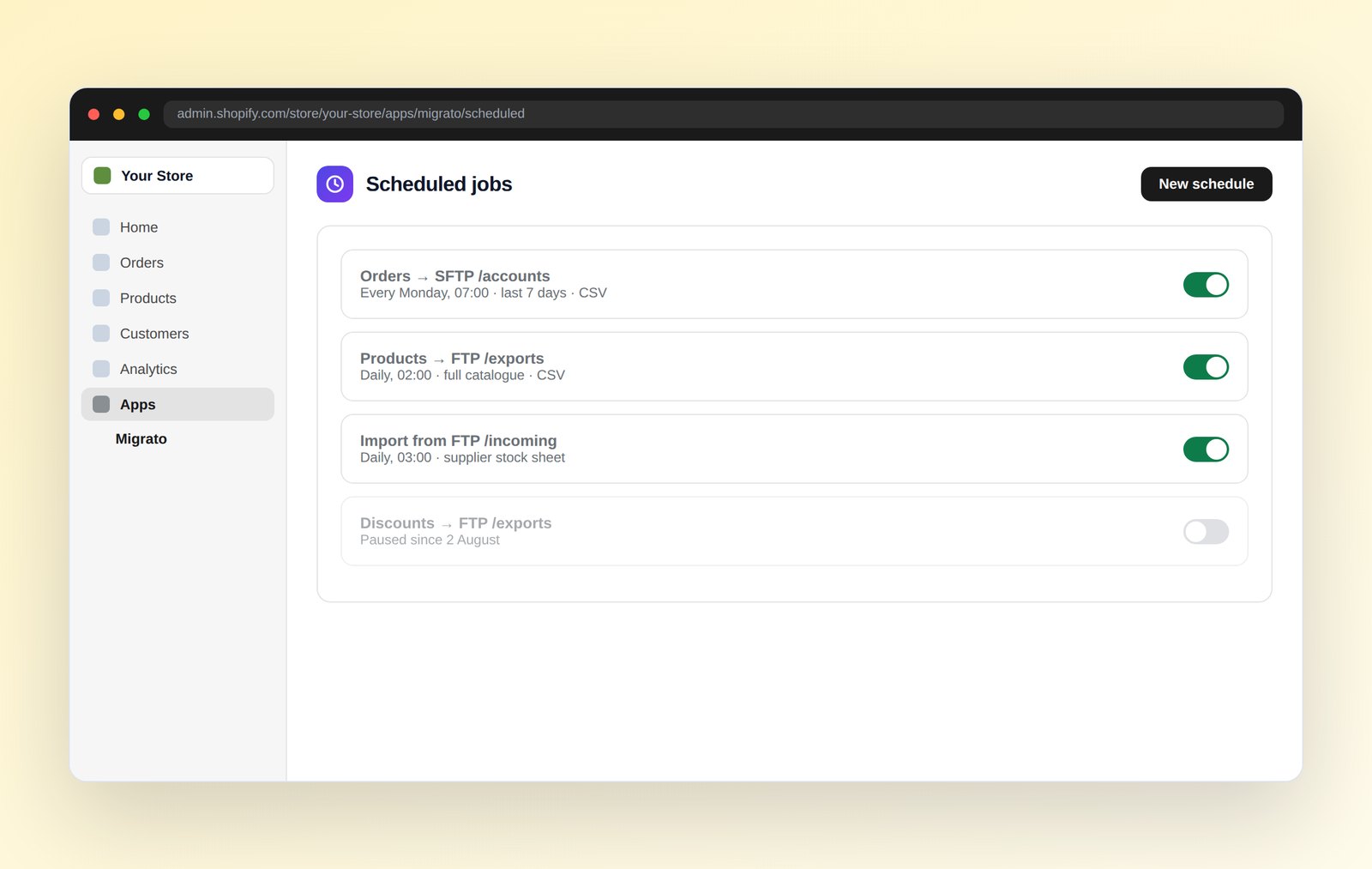
Any export can run on a schedule with the same filters every time and be uploaded to your FTP/SFTP server, and an import can fetch its sheet from a file URL or your FTP/SFTP server - so a supplier feed applies itself overnight.
Scheduled exports
Daily, weekly or monthly, at a time you choose, in your store's timezone.
Fetch the import sheet
Point a scheduled import at a file URL, or at a sheet waiting on your FTP/SFTP server.
Upload to FTP/SFTP
Finished export files are uploaded to your server as soon as the job completes.
Every run is logged
Each scheduled run gets its own job entry and downloadable result log, and can email you a summary when it finishes.
Migrato writes only what the operation you selected allows, records every row it touches, and hands you a log you can act on. Support is answered by the people who wrote the code.
The operation is yours to choose
Add-only jobs cannot overwrite, update-only jobs cannot create. You decide before it runs.
Downloadable result log
Every row accounted for - applied, updated or skipped - with an email summary when the job finishes.
OAuth and Shopify's own APIs
Installed through Shopify, no theme or storefront access, no password shared with us.
Human support on every plan
Median first reply under six hours, including on the free plan.
Each entity has its own import and export template. More are added with every release.
 Catalogue
4
 Customers
2
 Sales
4
 Content & store
7

Once your sheet is ready, the app takes under a minute of your attention.
Download the template for the entity you are moving and add your values to the matching columns. Exports come back in the same format.
your data, your paceUpload the sheet, or point a scheduled job at a file URL. Migrato checks the headers match the template before going further.
about 30 secondsAdd new records, update existing ones, do both, or delete the rows in your sheet. The job does only what you select here.
about 20 secondsThe job runs on our servers inside Shopify's rate limits. When it finishes you can download a result log naming any row that could not be applied.
hands-offThe free plan runs 25 items per job - enough to import a slice of your catalogue, check the result in your admin, and know whether this is the right tool.
Free plan forever
No credit card
2-minute setup
Uninstall anytime
Limits are counted per job, not per month - run as many jobs as you like on any plan. Every entity shares the same per-job limit.
| Entity | StarterFree | Basic$19/mo | Pro$39/mo | Premium$99/mo |
|---|---|---|---|---|
| Records per job, by entity | ||||
| Products | 25 | 6,000 | 60,000 | Unlimited |
| Smart collections | 25 | 6,000 | 6,000 | Unlimited |
| Custom collections | 25 | 6,000 | 6,000 | Unlimited |
| Orders | 25 | 6,000 | 6,000 | Unlimited |
| Draft orders | 25 | 6,000 | 6,000 | Unlimited |
| Customers | 25 | 6,000 | 6,000 | Unlimited |
| Companies | 25 | 6,000 | 6,000 | Unlimited |
| Discounts | 25 | 6,000 | 6,000 | Unlimited |
| Pages | 25 | 6,000 | 6,000 | Unlimited |
| Menus | 25 | 6,000 | 6,000 | Unlimited |
| Blog posts | 25 | 6,000 | 6,000 | Unlimited |
| Metaobjects | 25 | 6,000 | 6,000 | Unlimited |
| Files | 25 | 6,000 | 6,000 | Unlimited |
| Redirects | 25 | 6,000 | 6,000 | Unlimited |
| Activity | 25 | 6,000 | 6,000 | Unlimited |
| Payouts | 25 | 6,000 | 6,000 | Unlimited |
| Shop | 25 | 6,000 | 6,000 | Unlimited |
| Features | ||||
| Import from a sheet | ✓ | ✓ | ✓ | ✓ |
| Export to CSV / XLSX | ✓ | ✓ | ✓ | ✓ |
| Operation options per job | ✓ | ✓ | ✓ | ✓ |
| Result log on every job | ✓ | ✓ | ✓ | ✓ |
| Job history | ✓ | ✓ | ✓ | ✓ |
| Scheduled exports | - | ✓ | ✓ | ✓ |
| Scheduled import from URL or FTP/SFTP | - | ✓ | ✓ | ✓ |
| Upload exports to FTP/SFTP | - | ✓ | ✓ | ✓ |
| Email result summary | ✓ | ✓ | ✓ | ✓ |
| Configurable history retention | - | ✓ | ✓ | ✓ |
| Concurrent jobs | 1 | 1 | 2 | 4 |
| Support | Priority | 24h SLA | Named contact | |
Every plan includes operation options, result logs, job history and human support.
Upgrades are prorated by Shopify and you can move down again at any time.
Billed through Shopify on your normal invoice. No metered surprises, no "contact us" tier, and a free plan that stays free.
Enough to test a real file end to end before you spend anything.
 25 items per job
Products, collections & customers
Excel & CSV import and export
Operation options on every job
Job history and result logs
Email support
For a single store doing regular catalogue and order work.
6,000 items per job
6,000 items per job
All seventeen entities
Scheduled and repeat jobs
Scheduled import from URL or FTP/SFTP
FTP/SFTP upload & email summaries
Priority email support
For larger catalogues and regular supplier feeds.
60,000 items per job
60,000 items per job
Everything in Basic
Two concurrent jobs
Scheduled import from a file URL
Configurable history retention
Priority support, 24h response
For agencies and larger stores moving high volumes.
Unlimited items per job
Everything in Pro
Four concurrent jobs
Dedicated onboarding session
Named support contact
Powerful where it counts, simpler where it matters - and honest about where the alternatives are perfectly fine.
| Migrato This app | Legacy import apps The established players | Shopify's CSV importer Built into your admin | |
|---|---|---|---|
| File formats | Excel and CSV, both directions | Usually CSV only | CSV only |
| Error reporting | Row-level result log after every job | Varies - often a summary only | A generic failure email |
| Sheet format | One documented template per entity | Mapping screen you configure each time | Fixed template you must match |
| Entities covered | Seventeen, including orders and payouts | Most of the common ones | Products and customers only |
| Scheduling | Built in from the Basic plan | Usually available | None |
| Undoing a change | Re-import the export you took beforehand | Sometimes offered | Manual, record by record |
| Getting started | Free Plan, no card, no time limit | Trial that expires | Free |
| Price | From free, then $19 | Typically $20–$50 | Free |

Where we would not bother. Shopify's built-in CSV importer is genuinely fine for a simple product list with no variants and no deadline. Reach for Migrato when you need orders, discounts, payouts or the other entities Shopify's importer does not cover, a result log you can act on, or a job that runs on a schedule.
Something not covered here? Ask us directly – a person will answer.
Only if you ask it to. After you upload your sheet, and before the import starts, you choose the operation: add new records only, update existing records only, add and update, or delete the records listed in the sheet. An add-only job cannot overwrite anything, and an update-only job cannot create anything.
Beyond that, columns you leave out of the sheet are not touched, and records are matched on Shopify’s own keys – handle, SKU, email, order name or ID.
One row of data you import or export – one product, one order, one customer, one discount. Limits are per job, not per month, and there is no waiting period between jobs – run as many as you like on any plan. A 6,000-record Basic plan will import a 6,000-row sheet, and you can start the next job as soon as it finishes.
Yes. Export your data from the source platform as CSV or Excel, arrange it into the Migrato import sheet for that entity, and upload it. Our documentation has a step-by-step guide per platform, including the redirect work that protects your search rankings.
Every job produces a result file showing which rows succeeded and which failed, with the reason for each. Fix only the failed rows and re-upload – matching means the successful rows update rather than duplicate. Nothing has to be started over.
No. Migrato runs entirely outside your storefront and speaks only to Shopify’s Admin API. Your theme is never modified, no scripts are added to your pages, and your Core Web Vitals are unaffected.
Your sheets are transferred over encrypted connections and stored on access-controlled servers, and they are used only to run the job you started. Everything we hold is removed when you uninstall the app. While it is installed you control the retention yourself in Settings – keep the full history, or have records older than a number of days you choose erased automatically. We use official Shopify OAuth, request only the scopes we need, and never see your password.
Charges appear on your normal Shopify invoice through Shopify’s billing API, so there is no separate card on file with us. Upgrades are prorated by Shopify. Uninstalling the app ends the charge – you never have to email anyone to cancel.
Yes, at no extra cost. Anyone with Apps access in your Shopify admin can use Migrato, and the job log records which staff account ran each job. There are no per-seat charges on any plan.
Install Migrato free, run your first job in under five minutes, and get a real person on support from day one - including on the free plan.
Free plan forever
No credit card
2-minute setup
Uninstall anytime
 Install free from the App Store