 Our first app, Migrato, is live on the Shopify App Store

Template Documentation
Before preparing your file: Download the available Draft Order Demo CSV/XLSX file or export a sample draft order file from Migrato to understand the current template structure.
Migrato uses a structured template for importing and exporting Shopify Draft Order data.
The template contains groups of fields that represent different parts of a Draft Order, including order-level information, customer information, line items, product data, and metafields.
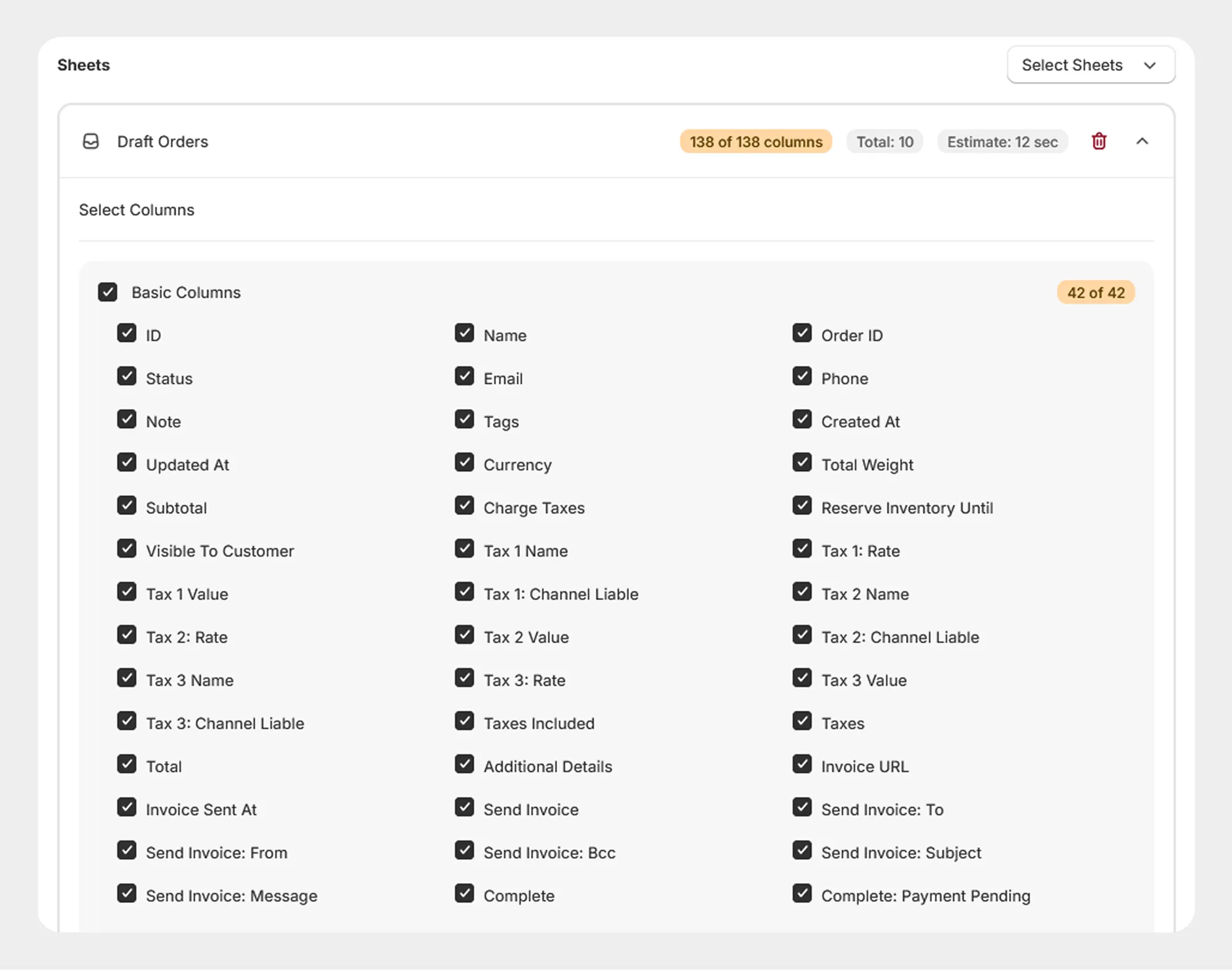
1. Basic Columns
The Basic Columns group contains the core information associated with a Draft Order, including identifiers, customer contact details, status, dates, pricing, taxes, inventory reservation, invoice details, and completion settings.
41 columns
The documentation for each field group should be presented below.
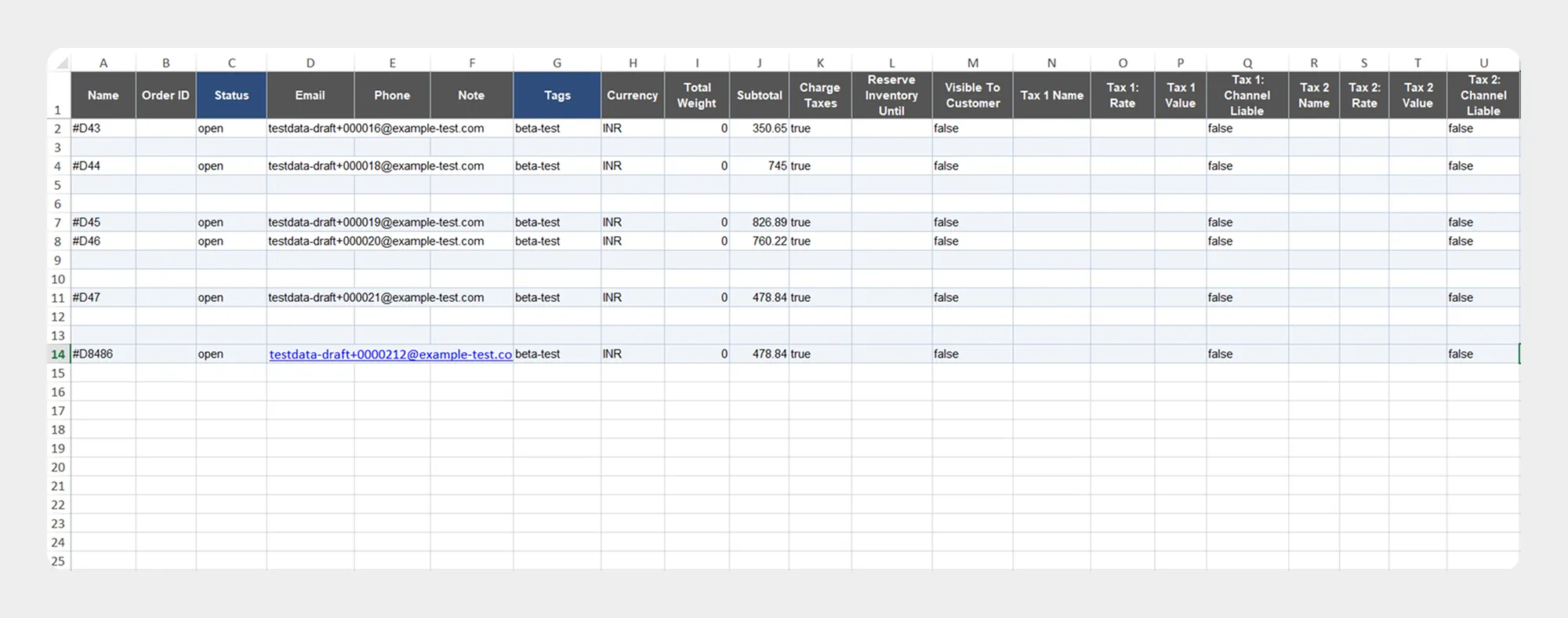
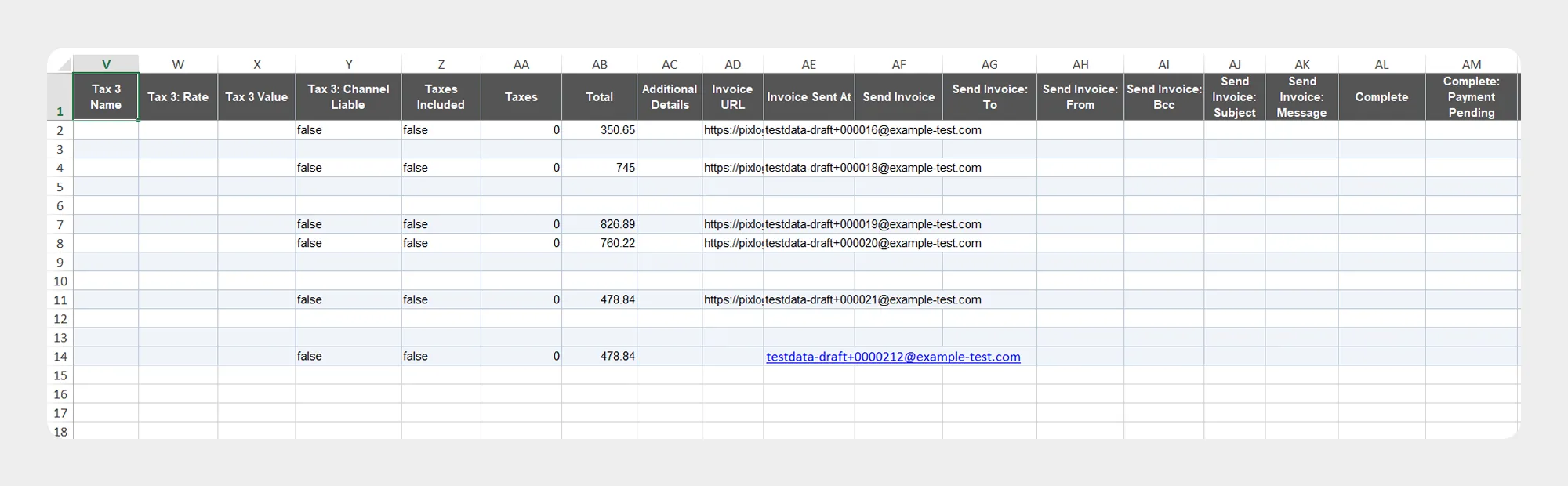
| Column | Description | Allowed Values / Examples |
|---|---|---|
| Id | Unique Shopify identifier for the Draft Order. | Number / Shopify Draft Order ID |
| Name | Display name or number assigned to the Draft Order. | #D1001 |
| Order ID | Shopify order identifier associated with the Draft Order when an order has been created from it. | Number / Shopify Order ID |
| Status | Current status of the Draft Order. | Open, Invoice Sent, Completed, Cancelled |
| Email address associated with the Draft Order. | customer@example.com |
|
| Phone | Text / Phone number | Phone number associated with the Draft Order. |
| Note | Note associated with the draft order. | Text |
| Tags | Tags assigned to the draft order. | priority, wholesale |
| Created At | Date and time when the order was created. | Date/time |
| Updated At | Date and time when the order was last updated. | Date/time |
| Currency | Currency used for the Draft Order. | USD, EUR, GBP |
| Total Weight | Total weight of the items in the Draft Order. | Number |
| Subtotal | Subtotal amount before applicable taxes and other charges | 150.00 |
| Charge Taxes | Indicates whether taxes should be charged for the Draft Order. | Yes/No |
| Reserve Inventory Until | Date and time until which inventory is reserved for the Draft Order. | Date/time |
| Visible To Customer | Indicates whether the Draft Order is visible to the customer. | Yes / No |
| Tax 1 Name | Name of the first tax applied to the Draft Order | GST |
| Tax 1 Rate | Rate of the first tax. | 18 |
| Tax 1 Value | Amount charged for the first tax. | 27 |
| Tax 1 Channel Liable | Indicates whether the sales channel is liable for the first tax. | Yes / No |
| Tax 2 Name | Name of the second tax applied to the Draft Order. | Text |
| Tax 2 Rate | Rate of the second tax. | Decimal / Percentage |
| Tax 2 Value | Amount charged for the second tax. | Decimal |
| Tax 2 Channel Liable | Indicates whether the sales channel is liable for the second tax. | Yes / No |
| Tax 3 Name | Name of the third tax applied to the Draft Order. | Text |
| Tax 3 Rate | Rate of the third tax. | Decimal / Percentage |
| Tax 3 Value | Amount charged for the third tax. | Decimal |
| Tax 3 Channel Liable | Indicates whether the sales channel is liable for the second tax. | Yes / No |
| Taxes Included | Indicates whether taxes are included in the displayed prices. | Yes / No |
| Taxes | Total tax amount associated with the Draft Order | 27.00 |
| Total | Total amount of the Draft Order. | 177.00 |
| Additional Details | Additional information associated with the Draft Order. | Text |
| Invoice URL | URL of the Draft Order invoice | URL |
| Invoice Sent At | Date and time when the invoice was sent | Date/time |
| Send Invoice | Indicates whether an invoice should be sent. | Yes / No |
| Send Invoice: To | Email address to which the invoice is sent. | |
| Send Invoice: From | Sender email address used for the invoice | |
| Send Invoice: Bcc | BCC email addresses used when sending the invoice | Email addresses |
| Send Invoice: Subject | Subject of the invoice email. | Text |
| Send Invoice: Message | Message included in the invoice email. | Text |
| Complete | Indicates whether the Draft Order should be completed | Yes/No |
| Complete: Payment Pending | Indicates whether the Draft Order should be completed | Yes / No |
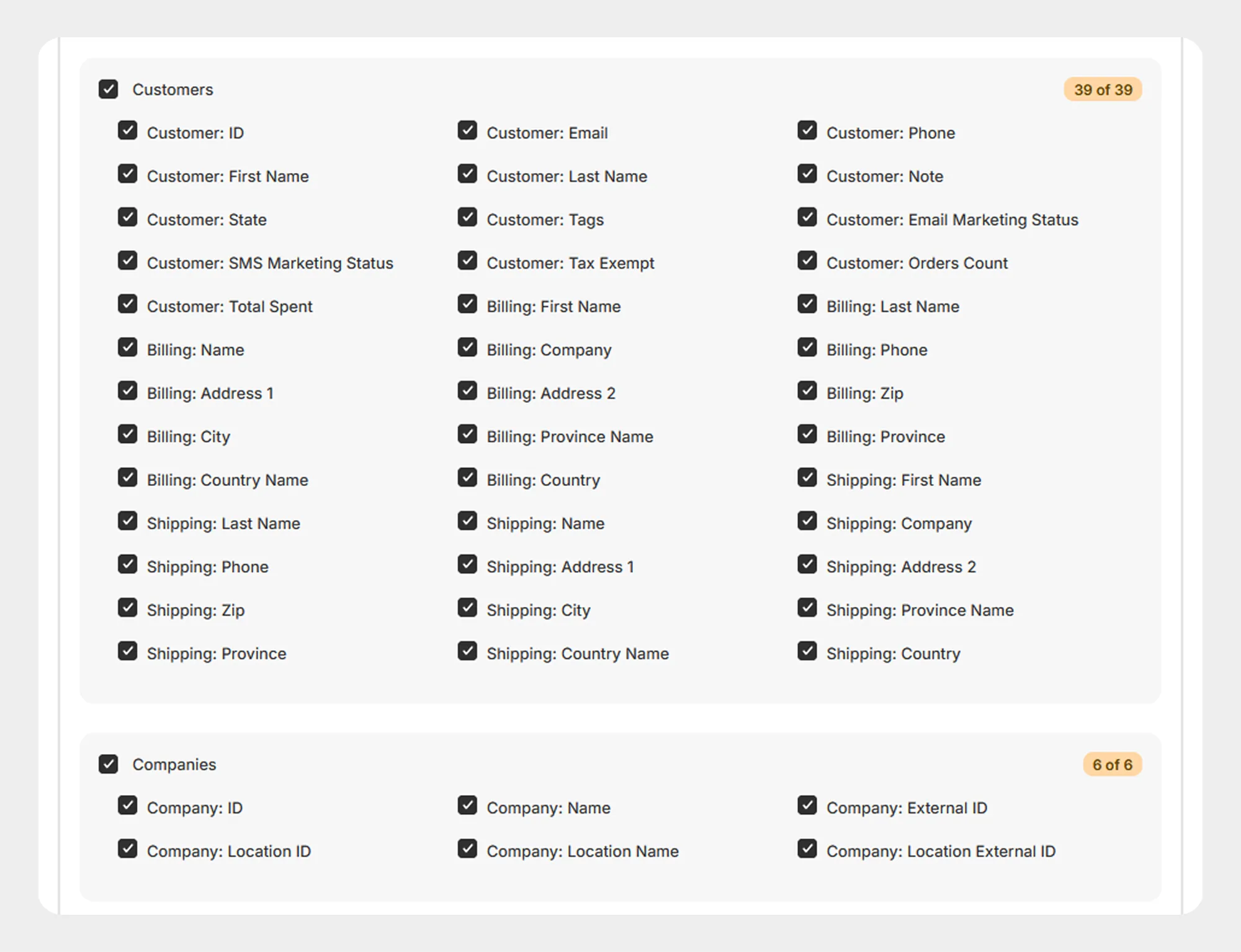
2. Customer
The Customer group contains customer, billing, and shipping information associated with the Draft Order
39 columns
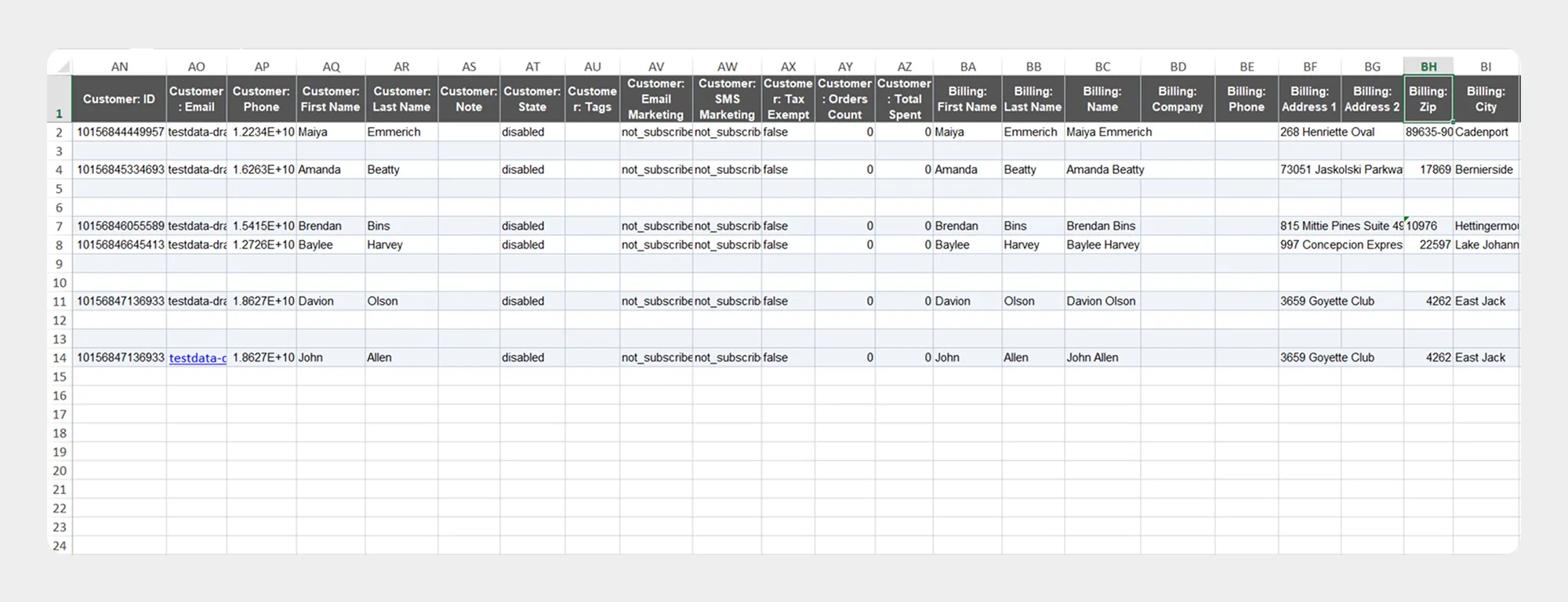
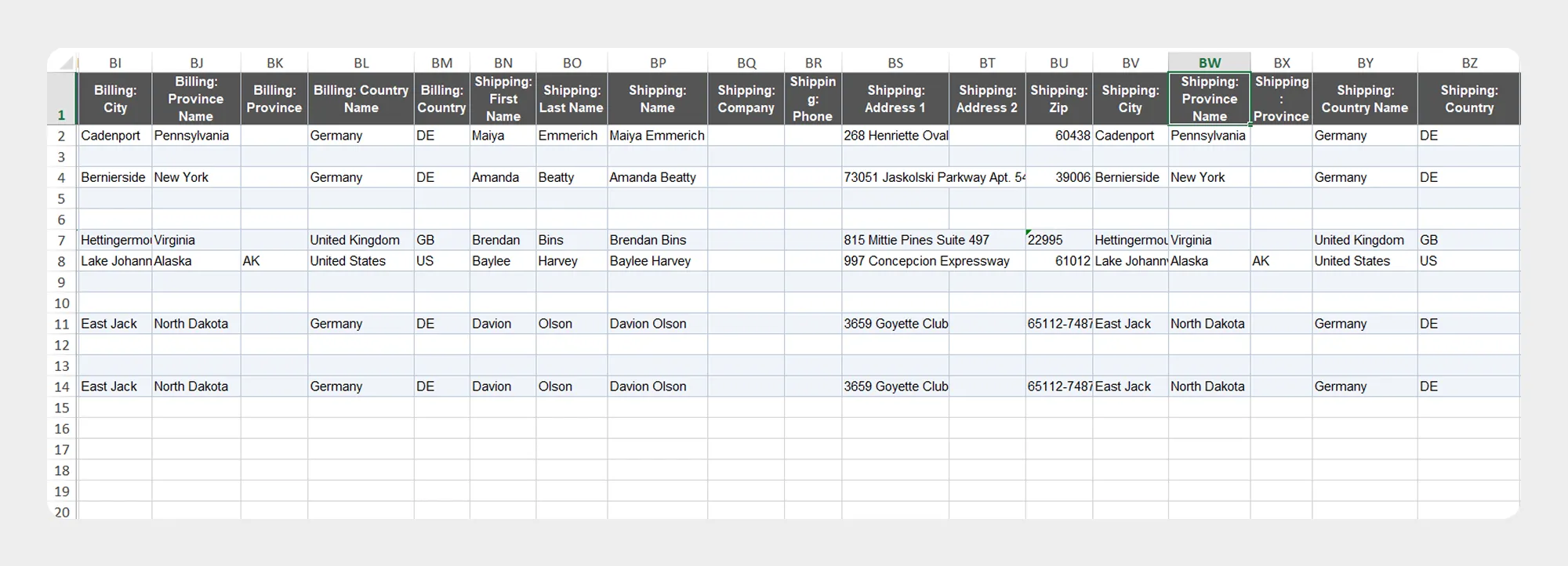
| Column | Description | Allowed Values / Examples |
|---|---|---|
| Customer: ID | Unique identifier of the customer. | Shopify Customer ID |
| Customer: Email | Customer email address. | customer@example.com |
| Customer: Phone | Customer phone number. | Phone number |
| Customer: First Name | Customer first name. | John |
| Customer: Last Name | Customer last name. | Smith |
| Customer: Note | Note associated with the customer. | Text |
| Customer: State | State of the customer account. | Shopify-supported customer state |
| Customer: Tags | Tags assigned to the customer. | VIP, wholesale |
| Customer: Email Marketing Status | Customer email marketing subscription status. | Shopify-supported status |
| Customer: SMS Marketing Status | Customer SMS marketing subscription status. | Shopify-supported status |
| Customer: Tax Exempt | Indicates whether the customer is tax exempt. | true / false |
| Customer: Orders Count | Number of orders associated with the customer. | Numeric value |
| Customer: Total Spent | Total amount spent by the customer. | Numeric amount |
| Billing: First Name | First name on the billing address. | John |
| Billing: Last Name | Last name on the billing address. | Smith |
| Billing: Name | Full name on the billing address. | John Smith |
| Billing: Company | Company listed on the billing address. | Company name |
| Billing: Phone | Phone number on the billing address. | Phone number |
| Billing: Address 1 | Primary billing address. | Address text |
| Billing: Address 2 | Additional billing address information. | Address text |
| Billing: Zip | Billing postal or ZIP code. | 380001 |
| Billing: City | Billing city. | Ahmedabad |
| Billing: Province Name | Billing province or state name. | Gujarat |
| Billing: Province | Billing province or state value. | GJ |
| Billing: Country Name | Billing country name. | India |
| Billing: Country | Billing country value/code. | IN |
| Shipping: First Name | First name on the shipping address. | John |
| Shipping: Last Name | Last name on the shipping address. | Smith |
| Shipping: Name | Full name on the shipping address. | John Smith |
| Shipping: Company | Company listed on the shipping address. | Company name |
| Shipping: Phone | Phone number on the shipping address. | Phone number |
| Shipping: Address 1 | Primary shipping address. | Address text |
| Shipping: Address 2 | Additional shipping address information. | Address text |
| Shipping: Zip | Shipping postal or ZIP code. | 380001 |
| Shipping: City | Shipping city. | Ahmedabad |
| Shipping: Province Name | Shipping province or state name. | Gujarat |
| Shipping: Province | Shipping province or state value. | GJ |
| Shipping: Country Name | Shipping country name. | India |
| Shipping: Country | Shipping country value/code. | IN |
3. Company
The Company group contains Shopify B2B company and company-location information associated with the draft order.
6 columns
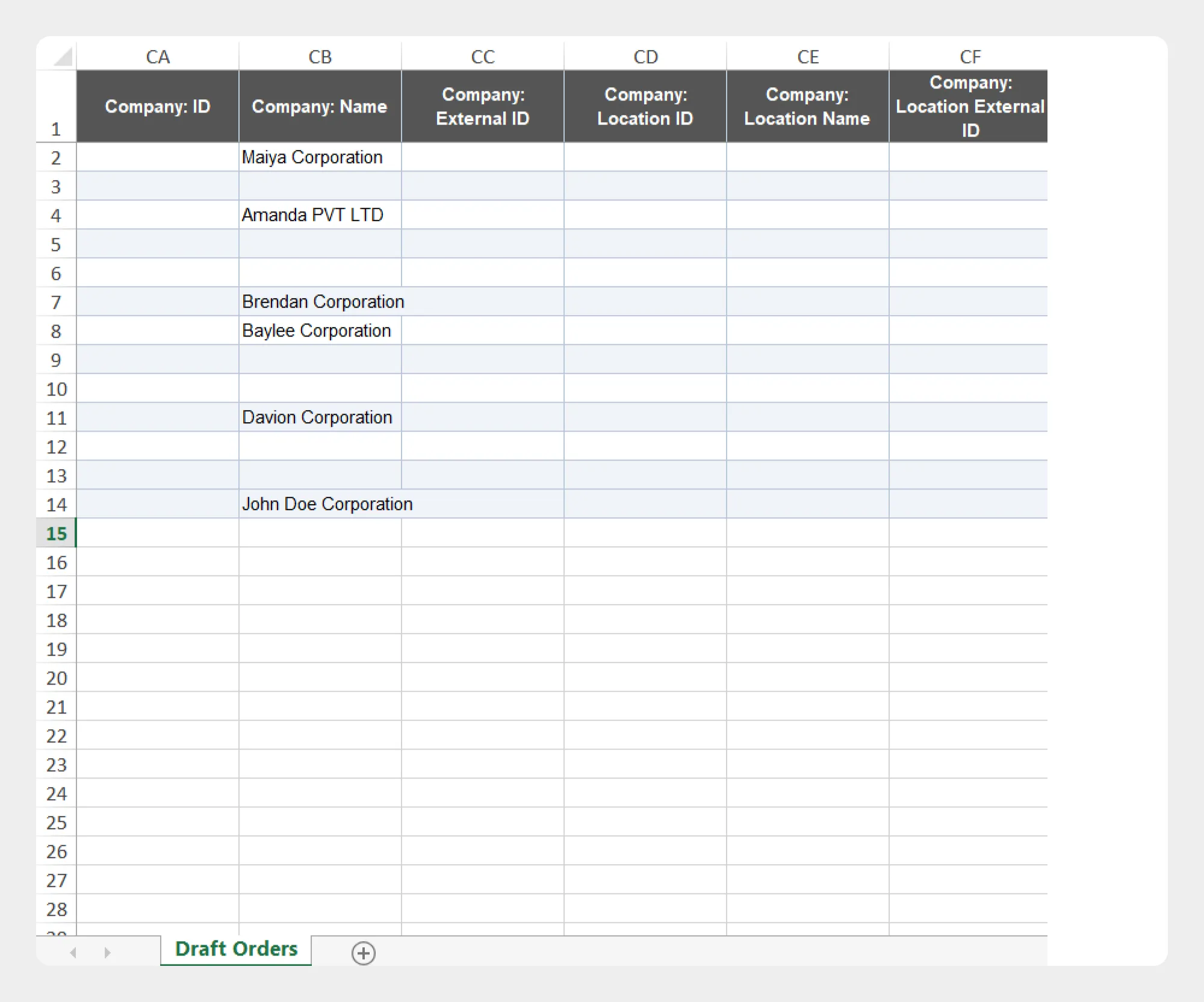
| Column | Description | Allowed Values / Examples |
|---|---|---|
| Company: ID | Unique identifier of the company. | Shopify Company ID |
| Company: Name | Name of the company. | ABC Company |
| Company: External ID | External identifier of the company. | Text / identifier |
| Company: Location ID | Unique identifier of the company location. | Shopify Location ID |
| Company: Location Name | Name of the company location. | New York Office |
| Company: Location External ID | External identifier of the company location. | Text / identifier |
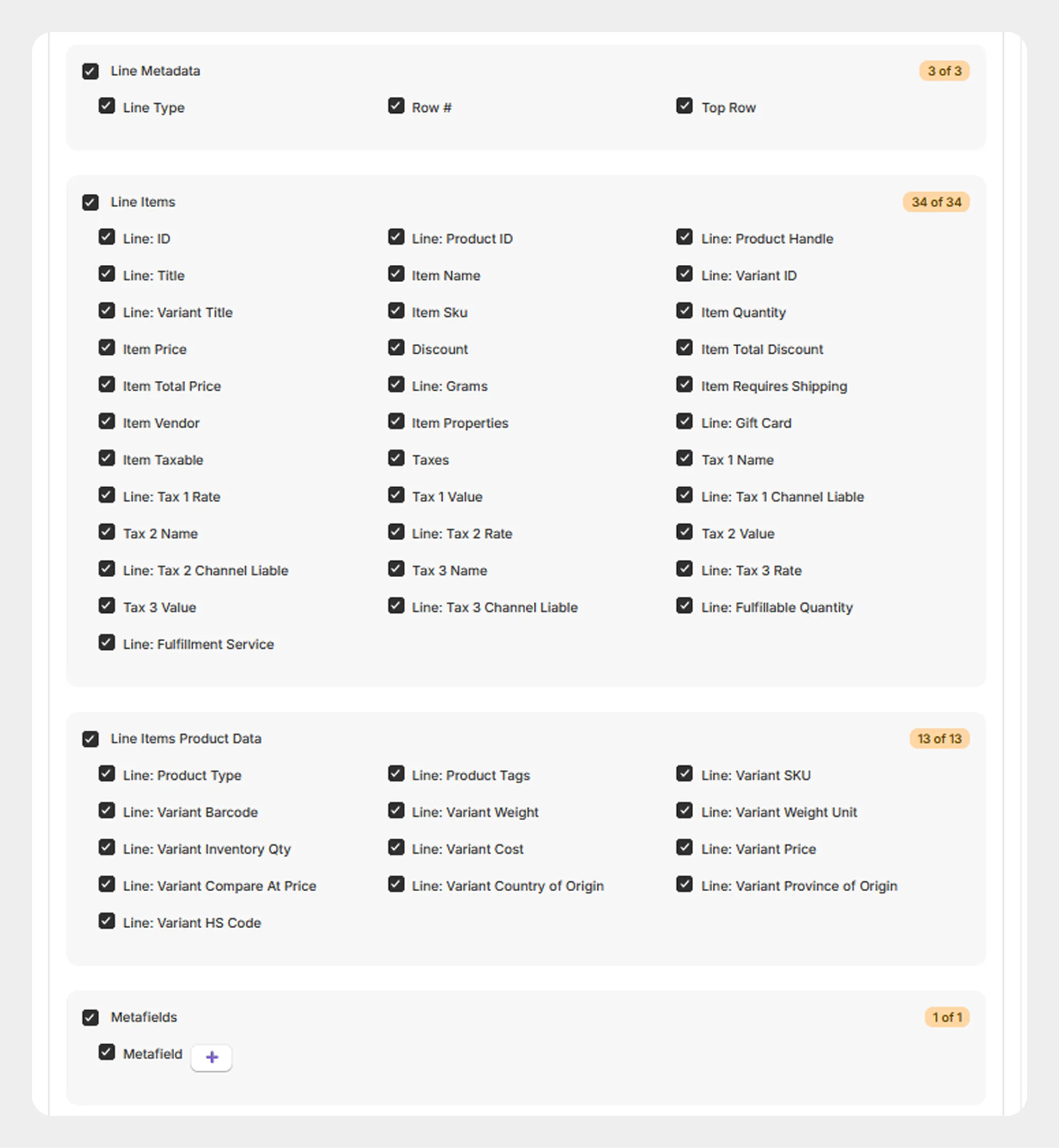
4. Line Type
The Line Type group identifies the structure and type of each row in the draft order data.
3 columns
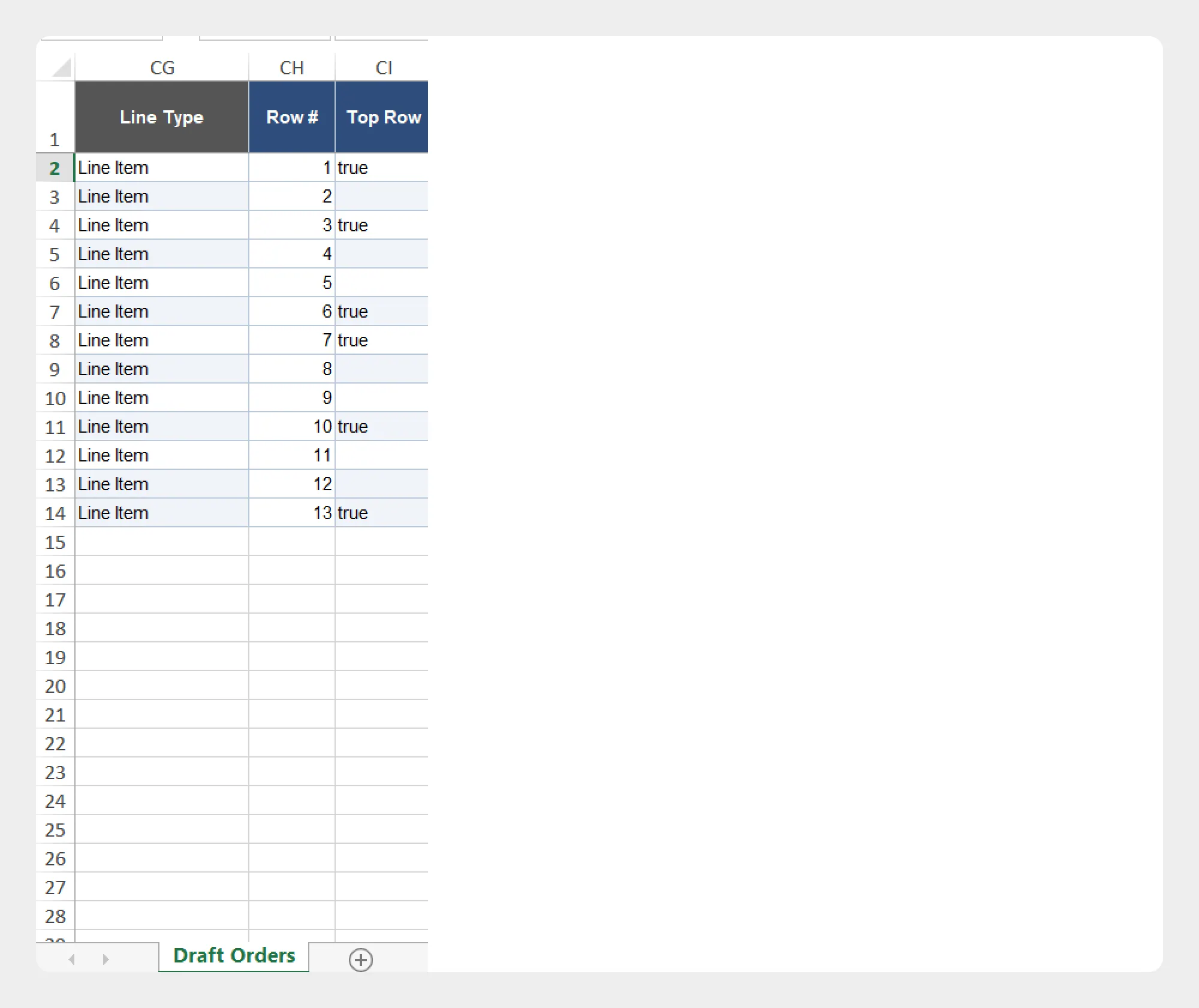
| Column | Description | Allowed Values / Examples |
|---|---|---|
| Row # | Row number associated with the order data. | Numeric value |
| Top Row | Indicates the top-level row associated with the order data. | Supported value |
| Line: Type | Identifies the type of line represented by the row. | Supported line type |
5. Line Items
The Line Items group contains information about the products and variants included in an draft order.
35 columns
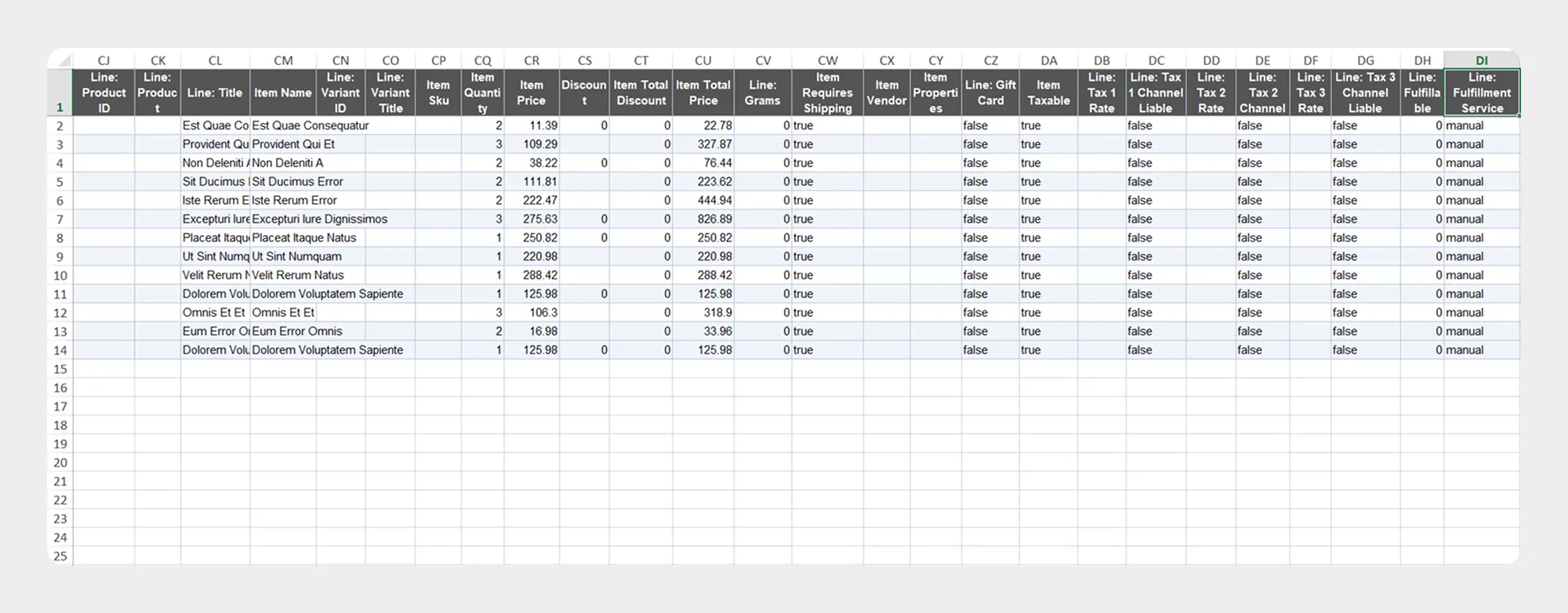
| Column | Description | Allowed Values / Examples |
|---|---|---|
| Line: ID | Unique identifier of the order line item. | Shopify Line Item ID |
| Line: Product ID | Shopify product ID associated with the line item. | Shopify Product ID |
| Line: Product Handle | Product handle associated with the line item. | mens-t-shirt |
| Line: Title | Product title associated with the line item. | Men's T-Shirt |
| Lineitem: Name | Name of the line item. | Product/variant name |
| Line: Variant ID | Shopify variant ID associated with the line item. | Shopify Variant ID |
| Line: Variant Title | Variant title. | Large / Blue |
| Item: SKU | SKU of the purchased variant. | TSHIRT-BLU-L |
| Item: Quantity | Quantity purchased. | Numeric value |
| Item: Price | Price of the line item. | Numeric amount |
| Item: Discount | Discount applied to the line item. | Decimal / Discount value |
| Item Total Discount | Total discount applied to the line item | Decimal |
| Item Total Price | Total price of the line item after applicable adjustments. | Decimal |
| Line: Grams | Weight of the line item in grams. | Numeric value |
| Item: Requires Shipping | Indicates whether the line item requires shipping. | true / false |
| Item: Vendor | Vendor associated with the line item. | Vendor name |
| Item: Properties | Additional properties associated with the line item. | Text / key-value data |
| Line: Gift Card | Indicates whether the line item is a gift card. | true / false |
| Item: Taxable | Indicates whether the line item is taxable. | true / false |
| Taxes | Total tax amount for the line item. | Numeric amount |
| Tax 1 Name | Name of the first tax applied to the line item. | Tax name |
| Line: Tax 1 Rate | Rate of the first tax. | Percentage / decimal |
| Tax 1 Value | Amount of the first line-item tax | Decimal |
| Tax 1 Channel Liable | Indicates whether the sales channel is liable for the first line-item tax. | Yes/No |
| Tax 2 Name | Name of the second tax applied to the line item. | Tax name |
| Line: Tax 2 Rate | Rate of the second tax. | Percentage / decimal |
| Tax 2 Value | Amount of the second line-item tax | Decimal |
| Tax 2 Channel Liable | Indicates whether the sales channel is liable for the second line-item tax. | Yes/No |
| Tax 3 Name | Name of the third tax applied to the line item. | Tax name |
| Line: Tax 3 Rate | Rate of the third tax. | Percentage / decimal |
| Tax 3 Value | Amount of the third line-item tax | Decimal |
| Tax 3 Channel Liable | Indicates whether the sales channel is liable for the second line-item tax. | Yes/No |
| Line: Fulfillable Quantity | Quantity remaining to be fulfilled. | Numeric value |
| Line: Fulfillment Service | Fulfillment service assigned to the line item. | Service name |
6. Line Items Product Data
The Line Items Product Data group contains additional product and variant information associated with draft order line items.
13 columns
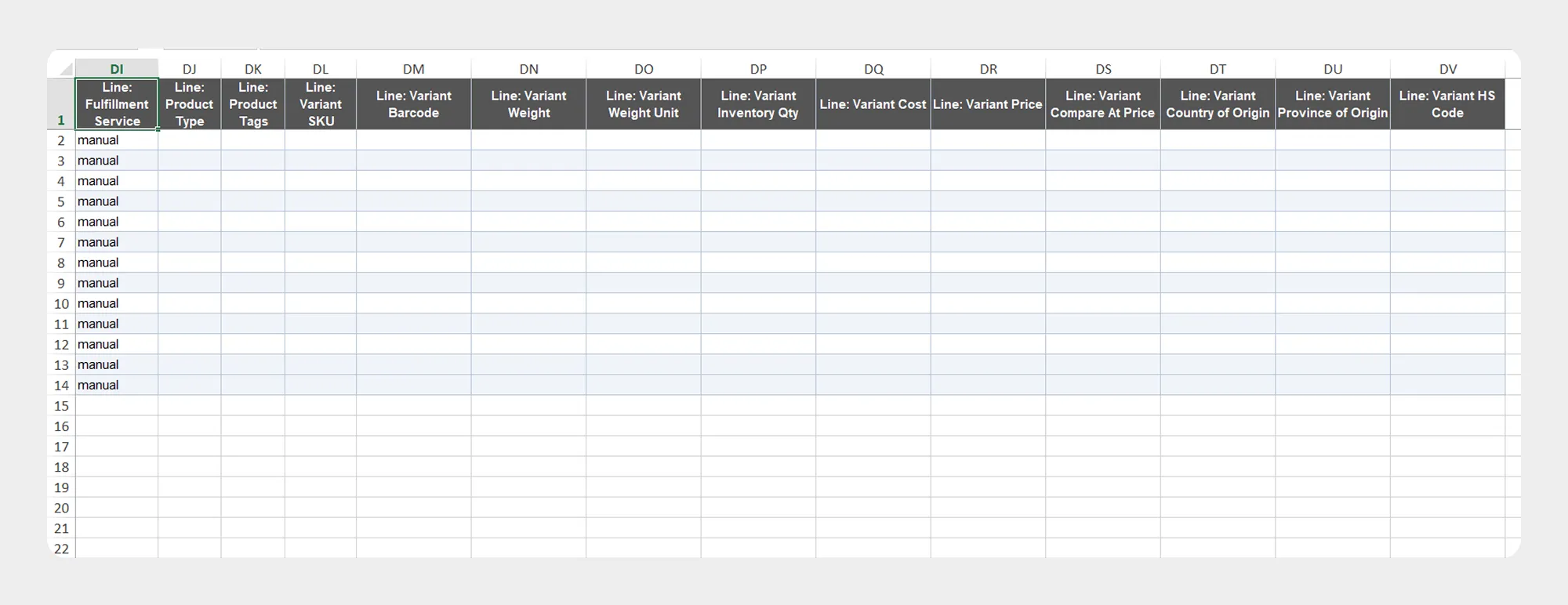
| Column | Description | Allowed Values / Example |
|---|---|---|
| Line: Product Type | Product type associated with the line item | T-Shirt |
| Line: Product Type | Tags assigned to the associated product | Comma-separated text |
| Line: Variant SKU | SKU of the associated product variant | TSHIRT-BLK-L |
| Line: Variant Barcode | Barcode of the associated product variant | Text / Barcode |
| Line: Variant Weight | Weight of the associated product variant. | Decimal |
| Line: Variant Weight Unit | Unit used for the variant weight | g, kg, oz, lb |
| Line: Variant Inventory Qty | Inventory quantity associated with the variant. | Integer |
| Line: Variant Cost | Cost associated with the product variant. | Decimal |
| Line: Variant Price | Price of the product variant. | Decimal |
| Line: Variant Compare At Price | Compare-at price of the product variant. | Decimal |
| Line: Variant Country of Origin | Country of origin associated with the product variant | Country name/code |
| Line: Variant Province of Origin | Province or state of origin associated with the product variant. | Text |
| Line: Variant HS Code | Harmonized System code associated with the product variant | Text / HS code |
7. Metafields
The Metafields group contains additional custom information associated with the Draft Order.
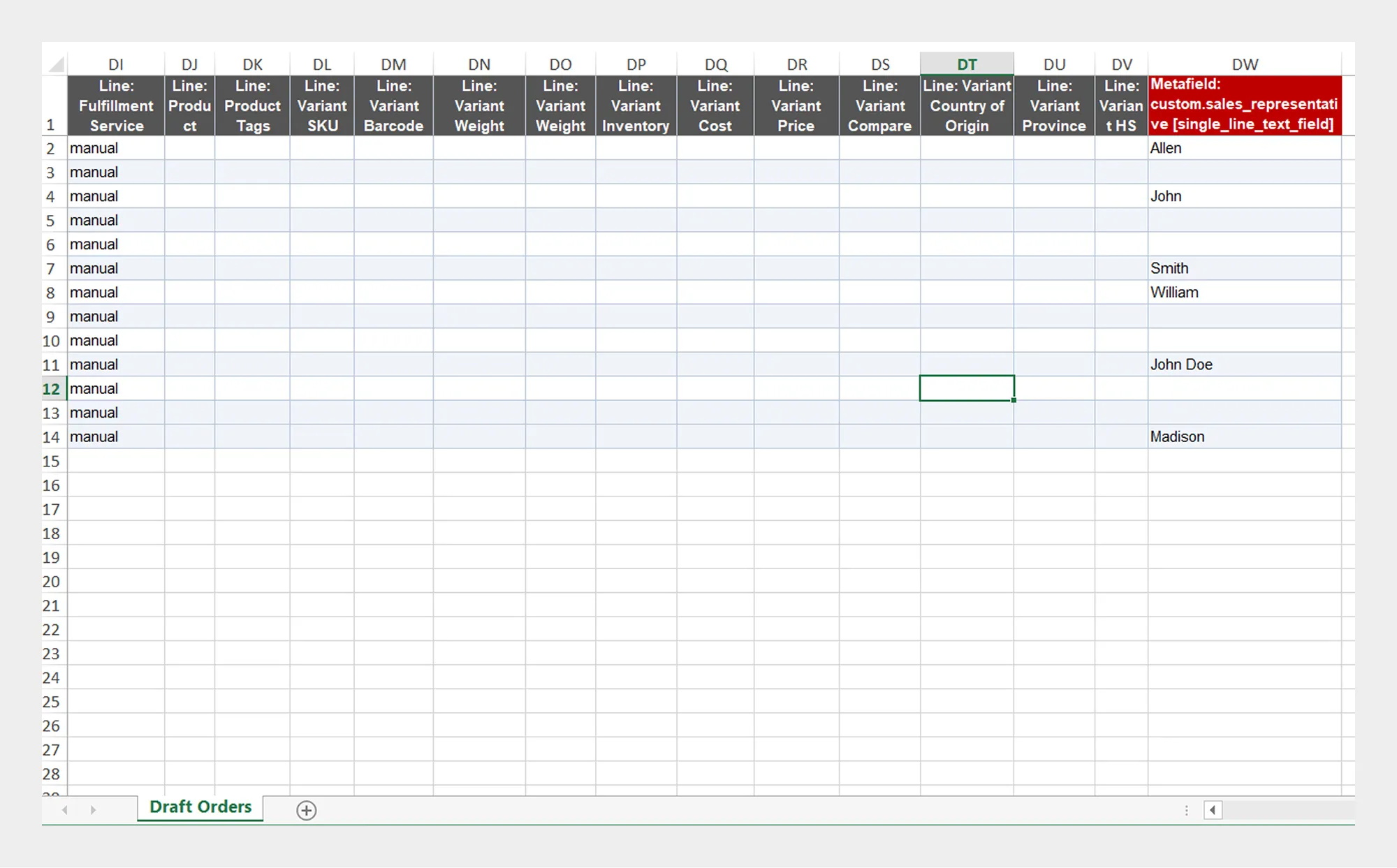
| Column | Description | Allowed Values / Example |
|---|---|---|
| Metafield | Additional custom data stored against the Draft Order using Shopify metafields. | Metafield data / Key-value structure |
Metafield data should match the metafield definitions configured in your Shopify store.
Preparing a Draft Order Import File
- Download the available Draft Order Demo CSV/XLSX file, if available.
- Review the Draft Order Template Documentation.
- Keep the column names unchanged
- Enter data according to the expected field format.
- Make sure related customer, product, variant, company, and line-item information is correctly structured.
- Save the file as CSV or XLSX.
- Upload the file to Migrato or provide the supported file URL.
- Review the import data and configuration.
- Start the import.
Using a Migrato-generated Draft Order export as a starting point can help maintain the expected column structure and data format.
 Install Migrato free
 Free plan forever